|
Work progress 0.97
|
|
| Tuskin | Date: Monday, 14.01.2013, 19:22 | Message # 541 |
 Space Pilot
Group: Users
 Canada
Messages: 94
Status: Offline
| Quote (SpaceEngineer) I will remove the fictional systems like Pandora and Caprica form the release... The fictional systems may be installed as addons though.
So you will have them up as an optional download? I quite like the BSG home system.
|
| |
| |
| dave | Date: Tuesday, 15.01.2013, 00:59 | Message # 542 |
|
Space Tourist
Group: Users
 United States
Messages: 35
Status: Offline
| Hey engineer, did you ever resolve the cloud height issue when reducing the atmosphere height?
|
| |
| |
| SolarLiner | Date: Tuesday, 15.01.2013, 19:20 | Message # 543 |
 Explorer
Group: Users
 France
Messages: 267
Status: Offline
| Quote (SpaceEngineer) Updated export textures menu:
Have you done somewhat a "UI/Graphic update" while exporting huge textures ? Because over 4096 img it takes so long that Windows belives that SE is not responding and "CTD" it after like 30s to 1 minute.
custom landing page to share: http://bit.ly/spaceengine
|
| |
| |
| HarbingerDawn | Date: Tuesday, 15.01.2013, 19:29 | Message # 544 |
 Cosmic Curator
Group: Administrators
United States
Messages: 8717
Status: Offline
| Quote (SolarLiner) Because over 4096 img it takes so long that Windows belives that SE is not responding and "CTD" it after like 30s to 1 minute.
I have been able to export up to 8192 with no problem. You may need to get windows to extend the timeout limit, and/or make sure that your graphics card can handle texture sizes over 4096.
All forum users, please read this!
My SE mods and addons
Phenom II X6 1090T 3.2 GHz, 16 GB DDR3 RAM, GTX 970 3584 MB VRAM
|
| |
| |
| astronomy_lover | Date: Tuesday, 15.01.2013, 22:44 | Message # 545 |
|
Observer
Group: Users
 Italy
Italy
Messages: 14
Status: Offline
| Excuse me, I think that this is the discussion where I can post my request.
My problem is this: there is an alternative combination of keys of the keybord to replace the command "Right drag" that is for rotate around selected object's center?
I try to explain my request, more best.
In Celestia, for example, to rotate around selected object's center, there are two possibilities:
- Right drag;
or
- Shift + Up (or Down, left, right) Arrow.
It is possible the same thing in Space Engine?
It is more important for me because to rotate a planet, or satellite, whit the drag mouse is very very difficult and tiresome.
Thank's for your answer in advance :)
Edited by astronomy_lover - Tuesday, 15.01.2013, 22:45 |
| |
| |
| HarbingerDawn | Date: Tuesday, 15.01.2013, 23:17 | Message # 546 |
|
Cosmic Curator
Group: Administrators
United States
Messages: 8717
Status: Offline
| You can set the camera to track the object (T key) and then use the movement buttons (WASD) to rotate the camera around the planet. You can of course change the rate of rotation by adjusting velocity. I know of no other keyboard alternatives that currently exist. Alternately, you might consider adjusting your mouse sensitivity to make click + drag easier?
All forum users, please read this!
My SE mods and addons
Phenom II X6 1090T 3.2 GHz, 16 GB DDR3 RAM, GTX 970 3584 MB VRAM
|
| |
| |
| astronomy_lover | Date: Tuesday, 15.01.2013, 23:36 | Message # 547 |
|
Observer
Group: Users
Italy
Messages: 14
Status: Offline
| HarbingerDawn,
Thank's for your answer, Dragon. I try with yours advices but it is not that I want to said. I don't want modify the sensibility of my mouse because I have other problems with the maneuverability of the mouse.
I hope that in the next version 0.97 of Space Engine there is the possibility of a combination of keys to replace the command "Right drag".
Thank's still for your attention 
Good night...
|
| |
| |
| werdnaforever | Date: Wednesday, 16.01.2013, 18:41 | Message # 548 |
 World Builder
Group: Users
 Pirate
Messages: 897
Status: Offline
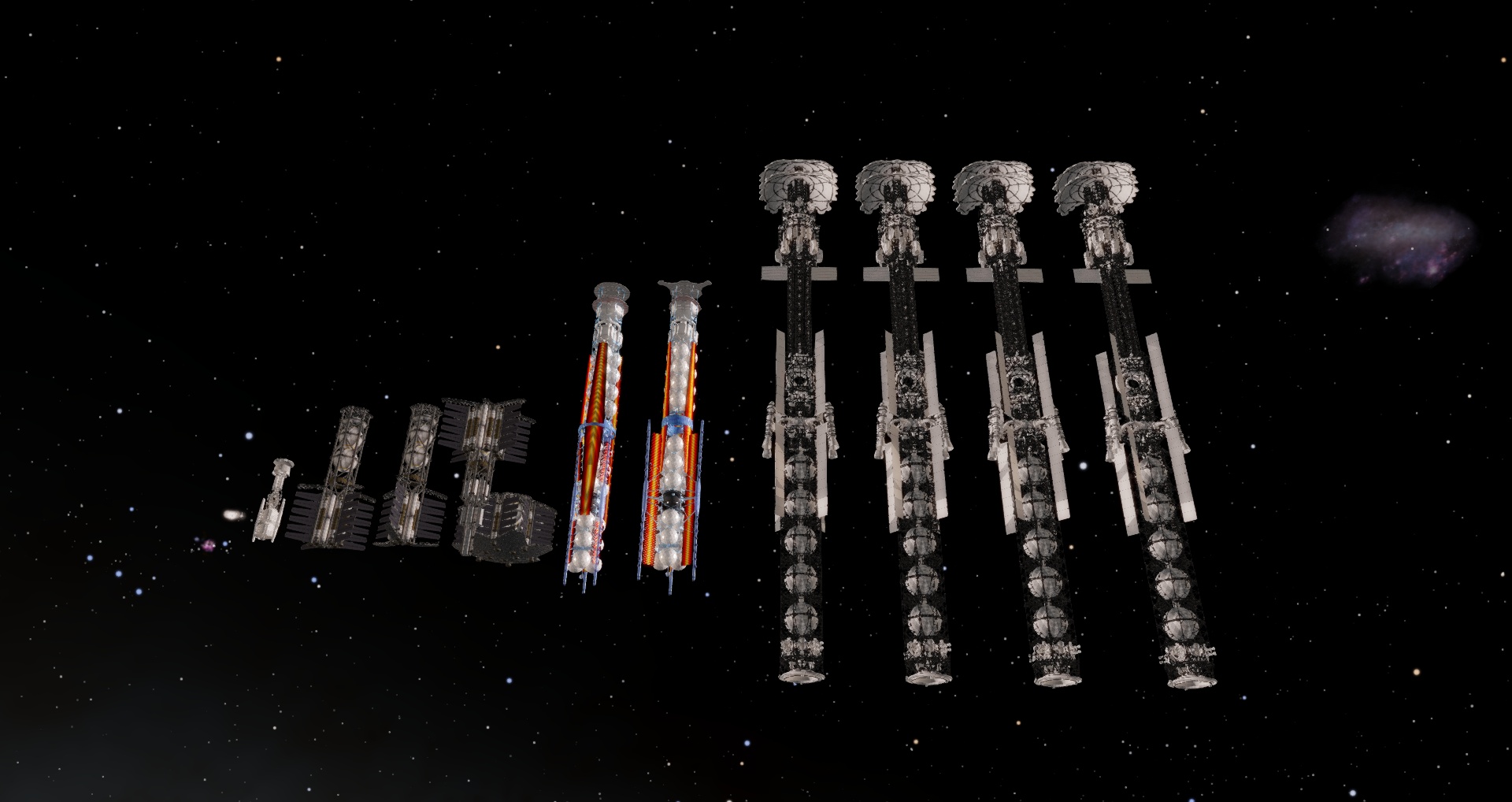
| Quote (SpaceEngineer) These screenshots show a fleet of all models I use now with 4 copies of one very huge ship. Its model has almost 1 million triangles and uses 104 Mb of VRAM, however it is stored only once, so these 4 ships use only 104 Mb.
Is that huge, awesome looking ship available for .96?
Edited by werdnaforever - Wednesday, 16.01.2013, 18:43 |
| |
| |
| HarbingerDawn | Date: Wednesday, 16.01.2013, 18:53 | Message # 549 |
|
Cosmic Curator
Group: Administrators
United States
Messages: 8717
Status: Offline
| Quote (werdnaforever) Is that huge, awesome looking ship available for .96?
Or 0.97 for that matter? And I'm more interested in that model on the far left, I've always liked that design. Who is making that one and will it be ready for 0.97?
All forum users, please read this!
My SE mods and addons
Phenom II X6 1090T 3.2 GHz, 16 GB DDR3 RAM, GTX 970 3584 MB VRAM
Edited by HarbingerDawn - Wednesday, 16.01.2013, 18:55 |
| |
| |
| SolarLiner | Date: Wednesday, 16.01.2013, 19:05 | Message # 550 |
|
Explorer
Group: Users
France
Messages: 267
Status: Offline
| Quote (HarbingerDawn) and/or make sure that your graphics card can handle texture sizes over 4096.
I once loaded with it a 16384 texture, so that is not the problem here.
Thanks for the link, I will try this.
custom landing page to share: http://bit.ly/spaceengine
|
| |
| |
| EmilyWright97 | Date: Wednesday, 16.01.2013, 19:54 | Message # 551 |
 Observer
Group: Newbies
United States
Messages: 7
Status: Offline
| 0.9.7 will be awesomeee!!!!!!
I look foward for the next update :DD
Yeah! :D
|
| |
| |
| SpaceEngineer | Date: Wednesday, 16.01.2013, 20:59 | Message # 552 |
 Author of Space Engine
Group: Administrators
 Russian Federation
Messages: 4800
Status: Offline
| The huge ship was made by AmID91 from Russian forum. It has an extremely high polycount and no textures. I don't believe it will be completed until release.
http://spaceengine.org/forum/11-17-7021-16-1334159308
http://spaceengine.org/forum/11-17-7425-16-1335897191
http://spaceengine.org/forum/11-17-9950-16-1341140070
The small starship model was made by Romario-3D (I believe), but I miss his post. Maybe you will find it there: http://spaceengine.org/forum/11-17-1

|
| |
| |
| HarbingerDawn | Date: Wednesday, 16.01.2013, 21:54 | Message # 553 |
|
Cosmic Curator
Group: Administrators
United States
Messages: 8717
Status: Offline
| Quote (SpaceEngineer) Romario-3D
It looks like he has left the community, he was last online more than two months ago  That's a shame, his model was my favorite, I really wanted to see it in SE. That's a shame, his model was my favorite, I really wanted to see it in SE.
All forum users, please read this!
My SE mods and addons
Phenom II X6 1090T 3.2 GHz, 16 GB DDR3 RAM, GTX 970 3584 MB VRAM
|
| |
| |
| Destructor1701 | Date: Friday, 18.01.2013, 14:59 | Message # 554 |
|
Pioneer
Group: Users
 Ireland
Messages: 533
Status: Offline
| Quote (AstronomyLover) HarbingerDawn,
Thank's for your answer, Dragon. I try with yours advices but it is not that I want to said. I don't want modify the sensibility of my mouse because I have other problems with the maneuverability of the mouse. I hope that in the next version 0.97 of Space Engine there is the possibility of a combination of keys to replace the command "Right drag".
Thank's still for your attention
Good night...
Edited by Destructor1701 - Friday, 18.01.2013, 15:06 |
| |
| |
| SpaceEngineer | Date: Tuesday, 22.01.2013, 21:43 | Message # 555 |
|
Author of Space Engine
Group: Administrators
Russian Federation
Messages: 4800
Status: Offline
| Updates:
Menu for selecting of the GUI language, changes applies without restarting
Fixed a flat landscape bug on Intel HD, added auto configuration at first launch
A lot of bugfixes during the beta test
|
| |
| |
 ENG
ENG New site


 Canada

 United States
  France

 Italy
Italy  Pirate
 Russian Federation
  Ireland