|
Work progress and public beta test - 0.9.7.4
|
|
| JackDole | Date: Friday, 18.09.2015, 23:16 | Message # 496 |
 Star Engineer
Group: Local Moderators
 Germany
Messages: 1742
Status: Offline
| Alek,
This is the Nvidia driver page
Don't forget to look here.

|
| |
| |
| Alek | Date: Saturday, 19.09.2015, 03:01 | Message # 497 |
 Pioneer
Group: Users
 United States
Messages: 326
Status: Offline
| JackDole, still too many problems for me to update my drivers right now, but I know someone who'll be able to figure all this out next time they're over, but thanks for the help, I appreciate it.
Living among the stars, I find my way. I grow in strength through knowledge of the space I occupy, until I become the ruler of my own interstellar empire of sorts. Though The world was made for the day, I was made for the night, and thus, the universe itself is within my destiny.
|
| |
| |
| Donatelo200 | Date: Saturday, 19.09.2015, 15:25 | Message # 498 |
|
Explorer
Group: Users
United States
Messages: 261
Status: Offline
| It looks like two distant stars are eclipsing. It is not a bug, just a limitation of the engine right now because the stars are so far away.
CPU: Intel Core i7-4790K
GPU: Nvidia GTX 1080
SSD: Samsung 850 Evo 250GB
HDD: Toshiba DT01ACA200 2TB
HDD: WD Blue 1TB (2012)
RAM: Unknown 16G-D3-1600-MR 2x8GB
MBD: MSI Z97S SLI Krait Edition (MS-7922)
|
| |
| |
| Destructor1701 | Date: Sunday, 20.09.2015, 02:25 | Message # 499 |
|
Pioneer
Group: Users
 Ireland
Messages: 533
Status: Offline
| Yeah, the new Z-buffer ought to solve that issue, if I understand the cause correctly.

|
| |
| |
| the_other_roots | Date: Wednesday, 23.09.2015, 15:45 | Message # 500 |
|
Observer
Group: Users
Germany
Messages: 17
Status: Offline
| The planet surface missing rectangles issue does also apply for stars, at least when tested with red giants. As soon as you come very close to their surface, some parts are missing and you can see through the star.
Another issue:
When you are close to an object and have selected a space ship approaching the object, the gravitational acceleration should increase on approach. But the displayed indication is not being updated (live), unless you have the engines deployed on at least 1% thrust.
If I am being sucked into a black hole for example, my acceleration should be about 1 c/s^2 in the end, but if I haven't the engines deployed, it still shows the initial acceleration when I'm in the center of the black hole.
Edited by the_other_roots - Wednesday, 23.09.2015, 21:18 |
| |
| |
| SpaceEngineer | Date: Thursday, 24.09.2015, 21:56 | Message # 501 |
 Author of Space Engine
Group: Administrators
 Russian Federation
Messages: 4800
Status: Offline
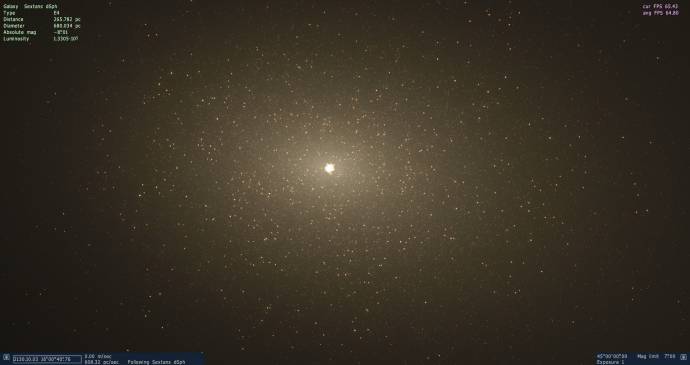
| Fixed star generation bug in a dwarf galaxies:

|
| |
| |
| sinsforeal | Date: Friday, 25.09.2015, 01:39 | Message # 502 |
 Space Pilot
Group: Users
United States
Messages: 129
Status: Offline
| SpaceEngineer, What did it look like before?
"Man once looked up at the stars and wondered, Now all we do is look at our hands and hesitate"
|
| |
| |
| n0b0dy | Date: Friday, 25.09.2015, 07:05 | Message # 503 |
 Explorer
Group: Users
 Pirate
Messages: 297
Status: Offline
| Quote sinsforeal (  ) What did it look like before?
I think (but not sure  ) it generated stars in the centre of the galaxy only and then it cutoff abruptly. ) it generated stars in the centre of the galaxy only and then it cutoff abruptly.
|
| |
| |
| SpaceEngineer | Date: Friday, 25.09.2015, 09:52 | Message # 504 |
|
Author of Space Engine
Group: Administrators
Russian Federation
Messages: 4800
Status: Offline
| Quote n0b0dy ( ) I think (but not sure ) it generated stars in the centre of the galaxy only and then it cutoff abruptly.
Exactly.
|
| |
| |
| Zefnoly | Date: Friday, 25.09.2015, 10:37 | Message # 505 |
 Space Tourist
Group: Users
Pirate
Messages: 38
Status: Offline
| Can't seem to get it working after hitting the "oculus rift" option on display settings. I did not mean to use it but i was changing something and hit it by accident. For some reason it freezed (it has been working earlier) but now i can't use it. I'ts freezing right after loading up...
EDIT: Solved it, just changed the settings file to not use oculus rift and now it's working 
A creature from a planet found far on the other side of Milkyway, found on a planet orbiting a gas giant.

Edited by Zefnoly - Friday, 25.09.2015, 10:41 |
| |
| |
| Tangle10 | Date: Saturday, 26.09.2015, 14:01 | Message # 506 |
 Space Pilot
Group: Users
United States
Messages: 129
Status: Offline
| Quote SpaceEngineer ( ) star generation bug
Oh hell yes. Does this mean that my tiny spirals might be able to have stars outside of the bulge?
...(also I am panicking because all my stars blacked text blacked out and I'm pretty sure this is just a result of settings failure and mods maybe so I am reinstalling game and it seems like the link is an error link for the beta5)
Tips for finding Earth-Like planets: Look for F, G, or K Class stars. M class habitables will almost always be tidelocked. Oceanias can, of course, also be habitable, they just have tiny amounts of land.
Edited by Tangle10 - Saturday, 26.09.2015, 14:27 |
| |
| |
| SpaceEngineer | Date: Saturday, 26.09.2015, 21:00 | Message # 507 |
|
Author of Space Engine
Group: Administrators
Russian Federation
Messages: 4800
Status: Offline
| Patch 06 (11 Mb)
Mirror 1
Mirror 2
Changes:
Docking functionality for space ships
Ship editor is updated to support docking ports
Added ship's autopilot command "fly to" (normal space mode)
Improved quality and performance of the logarithmic z-buffer
Implemented reversed floating point z-buffer:
-- Rendering orbital paths with proper order with planets and ships
-- Fixed z-fighting issues on water and clouds
-- Allowed to place camera up to few centimeters to planet surface or space ship
Bugfixes:
Fixed inability to change ship's hyperfactor if engines are off
Fixed autopilot warp to stars
Fixed "rotate to ship" command
Fixed ship's gravity acceleration display
Fixed procedural stars generation in dwarf galaxies
Notes:
New z-buffer is enabled by default. It may not work on Intel. To switch back to normal z-buffer, set DepthBufferMode 0 in main.cfg
Only default ships are updated to use new docking function. DoctorOfSpace is working on his addons now.
|
| |
| |
| Alek | Date: Saturday, 26.09.2015, 21:14 | Message # 508 |
|
Pioneer
Group: Users
United States
Messages: 326
Status: Offline
| Quote SpaceEngineer ( ) Patch 06 (11 Mb)
Mirror 1
Mirror 2
Changes:
Docking functionality for space ships
Ship editor is updated to support docking ports
Added ship's autopilot command "fly to" (normal space mode)
Improved quality and performance of the logarithmic z-buffer
Implemented reversed floating point z-buffer:
-- Rendering orbital paths with proper order with planets and ships
-- Fixed z-fighting issues on water and clouds
-- Allowed to place camera up to few centimeters to planet surface or space ship
Bugfixes:
Fixed inability to change ship's hyperfactor if engines are off
Fixed autopilot warp to stars
Fixed "rotate to ship" command
Fixed ship's gravity acceleration display
Fixed procedural stars generation in dwarf galaxies
Notes:
New z-buffer is enabled by default. It may not work on Intel. To switch back to normal z-buffer, set DepthBufferMode 0 in main.cfg
Only default ships are updated to use new docking function. DoctorOfSpace is working on his addons now.
Can I just download this into the Space Engine folder or do I need to download the other patches first? Never done this before, that's why I'm asking...
Living among the stars, I find my way. I grow in strength through knowledge of the space I occupy, until I become the ruler of my own interstellar empire of sorts. Though The world was made for the day, I was made for the night, and thus, the universe itself is within my destiny.
|
| |
| |
| Destructor1701 | Date: Saturday, 26.09.2015, 21:24 | Message # 509 |
|
Pioneer
Group: Users
Ireland
Messages: 533
Status: Offline
| Hot-damn!
|
| |
| |
| Canleskis | Date: Saturday, 26.09.2015, 21:42 | Message # 510 |
|
Space Pilot
Group: Users
 France
Messages: 117
Status: Offline
| HYPE IS REAL! Gonna test it now! Thanks a lot again and again!
|
| |
| |
 ENG
ENG New site


 Germany


 United States
 Ireland
 Russian Federation
 Pirate
  France