|
Troubleshooting - SpaceEngine 0.96
|
|
| HarbingerDawn | Date: Monday, 21.01.2013, 12:54 | Message # 256 |
 Cosmic Curator
Group: Administrators
 United States
Messages: 8717
Status: Offline
| Quote (Pipcard) Total video memory: 202 Mb
Available video memory: 202 Mb
Something odd seems to be going on here as well. Are your drivers up to date? Also, you should install the 0.9.6.2 patch.
All forum users, please read this!
My SE mods and addons
Phenom II X6 1090T 3.2 GHz, 16 GB DDR3 RAM, GTX 970 3584 MB VRAM
|
| |
| |
| Pipcard | Date: Monday, 21.01.2013, 18:33 | Message # 257 |
|
Observer
Group: Newbies
United States
Messages: 5
Status: Offline
| I downloaded the patch and it loads okay. But the planets all have blank textures. I don't know what drivers I should update.
Edited by Pipcard - Monday, 21.01.2013, 18:53 |
| |
| |
| HarbingerDawn | Date: Monday, 21.01.2013, 23:22 | Message # 258 |
|
Cosmic Curator
Group: Administrators
United States
Messages: 8717
Status: Offline
| Quote (Pipcard) I don't know what drivers I should update.
Your graphics drivers.
All forum users, please read this!
My SE mods and addons
Phenom II X6 1090T 3.2 GHz, 16 GB DDR3 RAM, GTX 970 3584 MB VRAM
|
| |
| |
| Gespenst | Date: Tuesday, 22.01.2013, 02:36 | Message # 259 |
 Observer
Group: Users
 Brazil
Messages: 10
Status: Offline
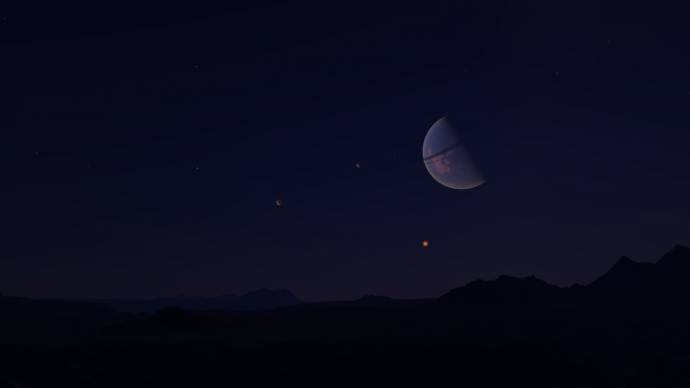
| This is normal, or it's just my computer?

What's causing this is the Galactic plane. As I move the camera to that direction, it gets worse...

|
| |
| |
| HarbingerDawn | Date: Tuesday, 22.01.2013, 05:06 | Message # 260 |
|
Cosmic Curator
Group: Administrators
United States
Messages: 8717
Status: Offline
| Quote (Gespenst) This is normal, or it's just my computer?
Is what normal? I don't see anything wrong.
All forum users, please read this!
My SE mods and addons
Phenom II X6 1090T 3.2 GHz, 16 GB DDR3 RAM, GTX 970 3584 MB VRAM
|
| |
| |
| Gespenst | Date: Tuesday, 22.01.2013, 07:21 | Message # 261 |
|
Observer
Group: Users
Brazil
Messages: 10
Status: Offline
| Quote (HarbingerDawn) Is what normal? I don't see anything wrong.
I don't know how I can explain lol
You can see the problem in the transition between the white from the plane and the black. It doesn't looks smooth.
Heres another example of the 'problem' (you can see 'waves' in the sky):
|
| |
| |
| midtskogen | Date: Tuesday, 22.01.2013, 09:02 | Message # 262 |
 Star Engineer
Group: Users
 Norway
Messages: 1674
Status: Offline
| Quote (Gespenst) Heres another example of the 'problem' (you can see 'waves' in the sky):
You mean brightness/colour gradients (kind of like isobars)? That's normal, but SpaceEngineer has reported an improvement for that in 0.97, at least for surface features.
NIL DIFFICILE VOLENTI

|
| |
| |
| Gespenst | Date: Tuesday, 22.01.2013, 10:46 | Message # 263 |
|
Observer
Group: Users
Brazil
Messages: 10
Status: Offline
| Quote (midtskogen) You mean brightness/colour gradients (kind of like isobars)? That's normal, but SpaceEngineer has reported an improvement for that in 0.97, at least for surface features.
Exactly! Thank you!
|
| |
| |
| HarbingerDawn | Date: Tuesday, 22.01.2013, 13:09 | Message # 264 |
|
Cosmic Curator
Group: Administrators
United States
Messages: 8717
Status: Offline
| I guess I'm just so accustomed to that issue that I don't even notice it. It is common to many programs and games.
All forum users, please read this!
My SE mods and addons
Phenom II X6 1090T 3.2 GHz, 16 GB DDR3 RAM, GTX 970 3584 MB VRAM
|
| |
| |
| SpaceEngineer | Date: Tuesday, 22.01.2013, 22:08 | Message # 265 |
 Author of Space Engine
Group: Administrators
 Russian Federation
Messages: 4800
Status: Offline
| The problem is in your monitor - 95% of consumer LCD monitors does not shows 16 million colors (24 bits), despite on that advertisement says. They are supports 16 million color video signal, but shows only 262000 colors (18 bits). It is a known deception, about which very few people knows.

|
| |
| |
| Gespenst | Date: Tuesday, 22.01.2013, 22:28 | Message # 266 |
|
Observer
Group: Users
Brazil
Messages: 10
Status: Offline
| Quote (SpaceEngineer) The problem is in your monitor - 95% of consumer LCD monitors does not shows 16 million colors (24 bits), despite on that advertisement says. They are supports 16 million color video signal, but shows only 262000 colors (18 bits). It is a known deception, about which very few people knows.
 Thanks! Thanks!
|
| |
| |
| Pipcard | Date: Wednesday, 23.01.2013, 01:32 | Message # 267 |
|
Observer
Group: Newbies
United States
Messages: 5
Status: Offline
| Updated the drivers and it works now. Thanks!
|
| |
| |
| okok456 | Date: Wednesday, 23.01.2013, 20:08 | Message # 268 |
|
Observer
Group: Newbies
United States
Messages: 3
Status: Offline
| MICROSOFT VISUAL C++RUNTIME ERROR
THIS APP HAS REQUESTED TO TERMINATE IT IN AN UNUSAL WAY.
ASK THE APPS SUPPORT TEAM FOR MORE INFO.
So i took the advice can any1 help me!?
|
| |
| |
| Solaris | Date: Wednesday, 23.01.2013, 23:54 | Message # 269 |
 World Builder
Group: Global Moderators
 France
Messages: 731
Status: Offline
| Hello okok456, Can you please post your se.log for allow us to help you (it's a text file in your SpaceEngine folder). Are your drivers up to date? Also are you running SpaceEngine with 0.9.6.2 patch?
|
| |
| |
| okok456 | Date: Thursday, 24.01.2013, 00:58 | Message # 270 |
|
Observer
Group: Newbies
United States
Messages: 3
Status: Offline
| here ya go.
|
| |
| |
 ENG
ENG New site


 United States


 Brazil
 Norway
  Russian Federation
 France