|
Work progress and public beta test - 0.9.7.4
|
|
| Brett001 | Date: Thursday, 23.06.2016, 21:53 | Message # 2911 |
 Space Pilot
Group: Users
 Hungary
Messages: 84
Status: Offline
| Proteus
Yes, this may be the explanation. Every saved locations was procedural.
|
| |
| |
| SpaceHopper | Date: Thursday, 23.06.2016, 22:29 | Message # 2912 |
 Explorer
Group: Users
 United States
Messages: 186
Status: Offline
| I found this glitchy mountain on a terra orbiting a white dwarf:
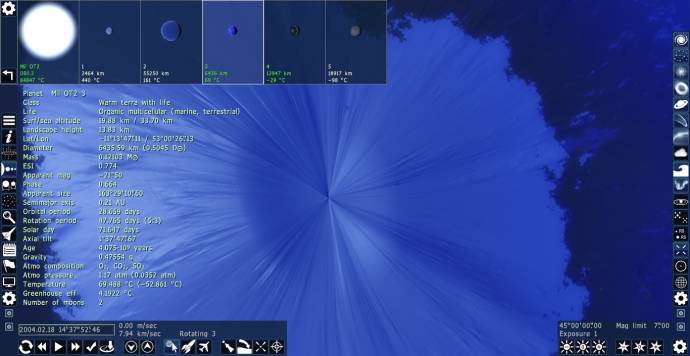
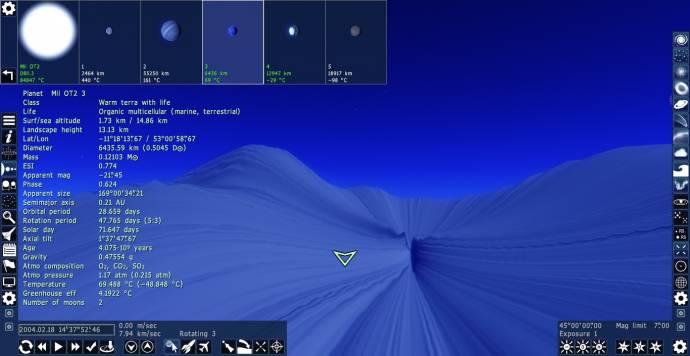
The location is RS 8474-1353-8-7790316-688 3.
Edit: Another one:
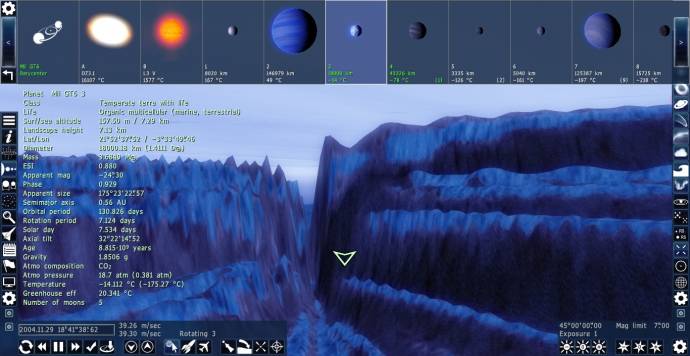
RS 8474-1353-8-7790568-251 3
3.14% of all seafarers are PIrates.
***
Got Mole Problems? Call Avogadro at 602-1023
***
Google Search my picture to discover whom it depicteth.
Edited by SpaceHopper - Thursday, 23.06.2016, 22:39 |
| |
| |
| PlutonianEmpire | Date: Thursday, 23.06.2016, 22:56 | Message # 2913 |
 Pioneer
Group: Users
United States
Messages: 475
Status: Offline
| Quote SpaceEngineer (  ) It pointing to 0.974 folder by default, because it is 0.974 installer. You should always be careful then running installers. Shouldn't you?
I already learned this lesson a long time ago;  I was already vigilant when first installing RC 3, knowing stuff like this could happen, so as soon as I got to the page asking me where to install, I immediately made sure to have the installer create a new folder for RC 3 instead of accidentally overwriting RC 2 by "default". I was already vigilant when first installing RC 3, knowing stuff like this could happen, so as soon as I got to the page asking me where to install, I immediately made sure to have the installer create a new folder for RC 3 instead of accidentally overwriting RC 2 by "default". 
Specs: Dell Inspiron 5547 (Laptop); 8 gigabytes of RAM; Processor: Intel® Core™ i5-4210U CPU @ 1.70GHz (4 CPUs), ~2.4GHz; Operating System: Windows 7 Home Premium 64-bit; Graphics: Intel® HD Graphics 4400 (That's all there is :( )
|
| |
| |
| SpaceEngineer | Date: Thursday, 23.06.2016, 23:14 | Message # 2914 |
 Author of Space Engine
Group: Administrators
 Russian Federation
Messages: 4800
Status: Offline
| Quote Salvo ( ) When you enter the ship editor (still I haven't found a button for it, I probably have to look more carefully), and you select the option to "edit one module", the list is completely blank. You can read the name of the module you're editing but not the other ones. (those are not blank strings because if you click on one you can read its name)
I didn't find any other bug that wasn't already reported. Except the fact that the Solar System browser doesn't show every planet, but that happened just a few times and I'm not able to reproduce it.
The list is simply too long, but GUI have limited number of letters to render. I added limit to the size of the list, so this should not happen anymore.
Also, the useful checkbox "hide structural modules" doesn't work because I forgot to update the ship model in this release You can fix that by adding the code
Type "Frame"
or
Type "Shield"
to the frame and shield modules cfg (data/models/spacecraft/modules/main_frame_base.cfg etc).

|
| |
| |
| Kosh | Date: Thursday, 23.06.2016, 23:51 | Message # 2915 |
 Space Tourist
Group: Users
United States
Messages: 29
Status: Offline
| I’ve noticed that the Kepler-64 system has a bug, and that is that the main star that Kepler-64 b orbits in a about 138 days and has an apparent magnitude of -15 or so in SE RC3 this wasn’t so in the previous versions SE. The apparent magnitude should be -27 or greater since Kepler-64 main star has an F class spectrum. The orbital period is correct.
I personally can see a lot of these systems falling through with so many being added to SE which is just fantastic! Here’s a good website to check them out, and wow! Eight more planets were added today! http://exoplanetarchive.ipac.caltech.edu/
What amazing times we live in today! 
|
| |
| |
| second-ich | Date: Friday, 24.06.2016, 10:23 | Message # 2916 |
 Space Pilot
Group: Users
 Germany
Messages: 87
Status: Offline
| Additionally to my request:
Quote second-ich ( )
When you are flying around using the Spacecraft or Aircraft mode and select an object (while flying) your movement will stop and you will fly to the selected object. Fine so far. But when you arrive at this object and the movement slowly stops you will suddenly move in the direction and with the speed you had before you pressed G.
Kind of the same thing happens also when you press C while flying in Spacecraft or Aircraft mode. The selected object will be centered shortly but then you move on.
In this case it would be nice if the camera keeps moving but the centered object stays also in the center of the screen.
Edited by second-ich - Friday, 24.06.2016, 10:23 |
| |
| |
| Ettore_bilbo | Date: Friday, 24.06.2016, 11:50 | Message # 2917 |
|
Space Pilot
Group: Users
 Italy
Italy
Messages: 93
Status: Offline
| really minor bug: when accessing the console I noticed that the first key pressed on the keyboard is not seen...
|
| |
| |
| Mosfet | Date: Friday, 24.06.2016, 22:07 | Message # 2918 |
 World Builder
Group: Users
Italy
Messages: 754
Status: Offline
| Elitecomentaris, Quote Elitecomentaris ( ) my AV has detected a threat in the uninstall executable...
it could be a false positive, can you share the name of the antivirus?
Reguarding the other question, if your doubt is the big vortex in the cloud layer, I've found a temperated terra with that same formation. Since it vanished once I removed the tidal lock, I think that those formations are a typical effect on clouds of tidal locked planets.
The other squares around the islands seem something possibly related to a glitch of your graphic card / drivers.
"Time is illusion. Lunchtime doubly so."
Douglas N. Adams
My mods
Asus x555ub: cpu i5-6200u - ram 4gb - gpu nvidia geforce 940m 2gb vram
|
| |
| |
| steeljaw354 | Date: Friday, 24.06.2016, 23:35 | Message # 2919 |
 World Builder
Group: Users
 Pirate
Messages: 862
Status: Offline
| How do you fix the error in which almost every terra with life has a lot of CO2?
|
| |
| |
| DoctorOfSpace | Date: Friday, 24.06.2016, 23:52 | Message # 2920 |
 Galaxy Architect
Group: Global Moderators
Pirate
Messages: 3600
Status: Offline
| Quote steeljaw354 ( ) error in which almost every terra with life has a lot of CO2?
How is this an error?
Intel Core i7-5820K 4.2GHz 6-Core Processor
G.Skill Ripjaws V Series 32GB (4 x 8GB) DDR4-2400 Memory
EVGA GTX 980 Ti SC 6GB
|
| |
| |
| Elitecomentaris | Date: Saturday, 25.06.2016, 00:10 | Message # 2921 |
 Observer
Group: Newbies
 Mexico
Messages: 7
Status: Offline
| Quote Mosfet ( )
it could be a false positive, can you share the name of the antivirus?
Reguarding the other question, if your doubt is the big vortex in the cloud layer, I've found a temperated terra with that same formation. Since it vanished once I removed the tidal lock, I think that those formations are a typical effect on clouds of tidal locked planets.
The other squares around the islands seem something possibly related to a glitch of your graphic card / drivers.
My AV was Microsoft Defender, but after scanning again with Avast no virus was detected, thankfully. ^_^
I wasn't quite refering to the existence of the giant storm (I'm aware they're common on t-locked planets), but the fact that the hurricane would actually move into the dark side of the planet entirely, which is a behaviour I had not seen before.
Edited by Elitecomentaris - Saturday, 25.06.2016, 00:11 |
| |
| |
| Hetairos | Date: Saturday, 25.06.2016, 13:04 | Message # 2922 |
|
Observer
Group: Users
 Poland
Messages: 18
Status: Offline
| Crossposting from the community fixes thread because it doesn't seem like anyone noticed it:
Quote The star CK Carinae has a radius of merely 1060 km. It should be 1060, but solar radii instead. I hope the new one is correct. Code // new radius
Star "CK Car/HD 90382/SAO 238038"
{
RA 10 24 25.3580
Dec -60 11 29.039
Dist 2176.8234
Class "M3 Ia"
AppMagn 7.59
Radius 737760000
Teff 3550
} |
| |
| |
| SaturnsMoonTitan | Date: Saturday, 25.06.2016, 13:20 | Message # 2923 |
|
Observer
Group: Newbies
 United Kingdom
Messages: 8
Status: Offline
| The map of Titan is horrendously inaccurate. Here's a screenshot showing lakes on Titan
http://i.imgur.com/Yxqv99i.png
The lakes match up with this part of Titan
http://i.imgur.com/21hhtWo.png
Only the black patches on the real map of Titan aren't lakes.. they are dunes. Sand dunes of organic material. The real lakes on Titan are at the poles, but there aren't any there in space engine's version of Titan. Someone seems to have misinterpreted the equatorial dune fields as lakes...
|
| |
| |
| steeljaw354 | Date: Saturday, 25.06.2016, 13:56 | Message # 2924 |
|
World Builder
Group: Users
Pirate
Messages: 862
Status: Offline
| Is there a way to switch oxygen and CO2 probabilities? Like how you go into the universe.cfg and edit stuff?
|
| |
| |
| PlutonianEmpire | Date: Saturday, 25.06.2016, 16:59 | Message # 2925 |
|
Pioneer
Group: Users
United States
Messages: 475
Status: Offline
| Quote DoctorOfSpace ( ) How is this an error?
He is referring to the fact that terra atmospheres regularly are 80% 90% CO2, even on lifeterras with really thick atmospheres (2+ atm)
Specs: Dell Inspiron 5547 (Laptop); 8 gigabytes of RAM; Processor: Intel® Core™ i5-4210U CPU @ 1.70GHz (4 CPUs), ~2.4GHz; Operating System: Windows 7 Home Premium 64-bit; Graphics: Intel® HD Graphics 4400 (That's all there is :( )
|
| |
| |
 ENG
ENG New site


 Hungary

 United States


 Russian Federation
  Germany
  Italy
Italy  Pirate

 Mexico
  Poland
  United Kingdom