|
Work progress and public beta test - 0.9.7.4
|
|
| Vilfate | Date: Thursday, 23.06.2016, 13:16 | Message # 2896 |
 Astronaut
Group: Users
 China
China
Messages: 49
Status: Offline
| Quote SpaceEngineer (  ) Ok, SE installer indeed deletes ALL files and folders in the installation directory before install. I fixed this in installer script, it will not do this in future
Thank you BTW for this ... after all, I got rid of all my obsolete RC2 captures

|
| |
| |
| Elitecomentaris | Date: Thursday, 23.06.2016, 14:57 | Message # 2897 |
 Observer
Group: Newbies
 Mexico
Messages: 7
Status: Offline
| I'm not sure if it's a bug or a feature, but yesterday while exploring I found a tidally-locked oceania whose giant typhoon drifts well into the unlit side. Has anybody else found a planet like this? Also, in the last picture two artifacts can be found in the lower-central part of the planet (could it be because I set the LOD to two?) Coordinates are also in the last pic.
Edited by Elitecomentaris - Thursday, 23.06.2016, 14:57 |
| |
| |
| The_Blazer | Date: Thursday, 23.06.2016, 15:16 | Message # 2898 |
|
Space Tourist
Group: Users
 Italy
Italy
Messages: 34
Status: Offline
| So the new volcanoes will occasionally do this. It looks as if one single point is being "pinched" infinitely tight or something. The effect is 3-dimensional, some of the creases stick out from the surface, not sure how well it's visible in these images.
Born too early to explore space... But just in time for Space Engine.
PC Specs:
GTX 770 (2GB VRAM) - i5 4570 - 8GB RAM
Edited by The_Blazer - Thursday, 23.06.2016, 15:17 |
| |
| |
| ShadowRaikou | Date: Thursday, 23.06.2016, 15:19 | Message # 2899 |
 Astronaut
Group: Users
 India
India
Messages: 53
Status: Offline
| Quote SpaceEngineer ( ) Ok, SE installer indeed deletes ALL files and folders in the installation directory before install. I fixed this in installer script, it will not do this in future smile
Thank you! =)
Quote The_Blazer ( ) So the new volcanoes will occasionally do this. It looks as if one single point is being "pinched" infinitely tight or something. The effect is 3-dimensional, some of the creases stick out from the surface, not sure how well it's visible in these images.
This is also happening on my end, and this actually happens on a volcano in the default RC3 location bookmarks.
Edited by ShadowRaikou - Thursday, 23.06.2016, 15:19 |
| |
| |
| Hornblower | Date: Thursday, 23.06.2016, 15:34 | Message # 2900 |
 World Builder
Group: Users
 United States
Messages: 714
Status: Offline
| I get that same volcano glitch too
|
| |
| |
| SpaceEngineer | Date: Thursday, 23.06.2016, 16:10 | Message # 2901 |
 Author of Space Engine
Group: Administrators
 Russian Federation
Messages: 4800
Status: Offline
| Quote Elitecomentaris ( ) I'm not sure if it's a bug or a feature, but yesterday while exploring I found a tidally-locked oceania whose giant typhoon drifts well into the unlit side. Has anybody else found a planet like this? Also, in the last picture two artifacts can be found in the lower-central part of the planet (could it be because I set the LOD to two?) Coordinates are also in the last pic.
It look normally to me... Did you used planet editor before taking the picture?
Quote The_Blazer ( ) So the new volcanoes will occasionally do this. It looks as if one single point is being "pinched" infinitely tight or something. The effect is 3-dimensional, some of the creases stick out from the surface, not sure how well it's visible in these images.
Yes, this problem exists, I don't know why volcanoes do that.
Quote ShadowRaikou ( ) This is also happening on my end, and this actually happens on a volcano in the default RC3 location bookmarks.
And this is not normal. I didn't save glitchy volcanoes into default locations. Can you make a screenshot?

|
| |
| |
| Elitecomentaris | Date: Thursday, 23.06.2016, 16:43 | Message # 2902 |
|
Observer
Group: Newbies
Mexico
Messages: 7
Status: Offline
| Quote It look normally to me... Did you used planet editor before taking the picture?
I haven't used the planet editor so far. I shall reinstall the game and see if the storm is still acting abnormally then.
Edit: It appears that my AV has detected a threat in the uninstall executable... A trojan Win32/Maltule.C!cl. Can anybody else confirm this?, this may be only client-sided.
Edited by Elitecomentaris - Thursday, 23.06.2016, 17:15 |
| |
| |
| Salvo | Date: Thursday, 23.06.2016, 17:46 | Message # 2903 |
 Star Engineer
Group: Local Moderators
Italy
Messages: 1400
Status: Offline
| Unfortunately bug reports aren't over yet. 
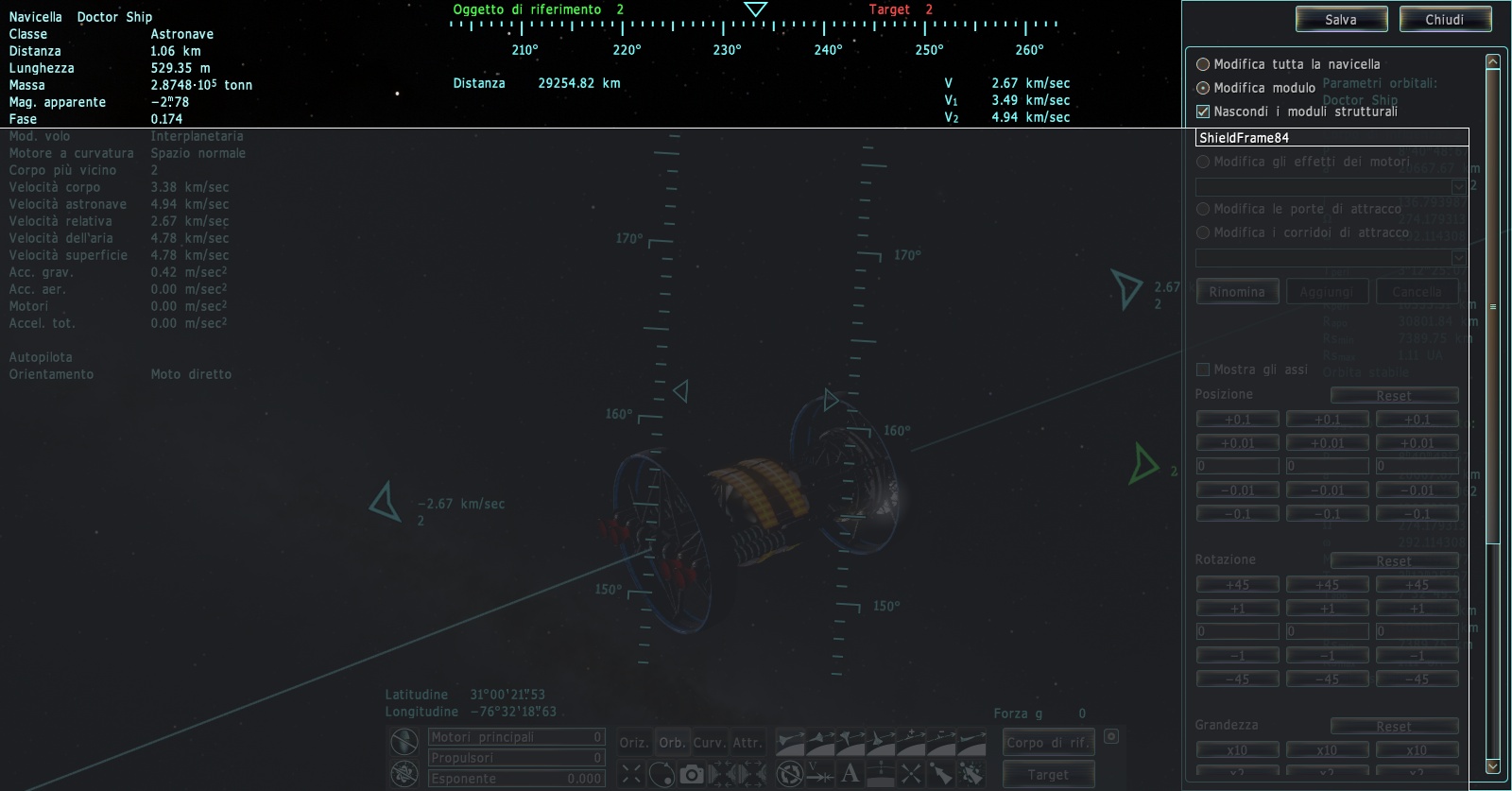
When you enter the ship editor (still I haven't found a button for it, I probably have to look more carefully), and you select the option to "edit one module", the list is completely blank. You can read the name of the module you're editing but not the other ones. (those are not blank strings because if you click on one you can read its name)

I didn't find any other bug that wasn't already reported. Except the fact that the Solar System browser doesn't show every planet, but that happened just a few times and I'm not able to reproduce it.
The universe is not required to be in perfect harmony with human ambition.
CPU: Intel Core i7 4770 GPU: ASUS Radeon R9 270 RAM: 8 GBs
(still don't know why everyone is doing this...)
|
| |
| |
| parameciumkid | Date: Thursday, 23.06.2016, 18:40 | Message # 2904 |
 Explorer
Group: Users
United States
Messages: 277
Status: Offline
| It looks to me that, in at least that one screenshot, the lava flow part of the shader seems to be slightly misaligned with the rest, so it's having all of the lava flows centered on a point just to the side of the summit.
Perhaps it's a floating-point precision issue?
Intel HD Graphics 4000 ;P
|
| |
| |
| SpaceEngineer | Date: Thursday, 23.06.2016, 18:44 | Message # 2905 |
|
Author of Space Engine
Group: Administrators
Russian Federation
Messages: 4800
Status: Offline
| Quote JackDole ( ) There is a problem with some multiple stars.
In the Barycenter appears a star that does not belong there.
The reason for this is that the 'WhiteDwarfs-bin.sc' in the 'Catalogs0974.pak' archive has an older date than the 'HIPPARCOS.csv'. Therefore the 'RemoveStar' command does not work.
Indeed new catalogs system have drawbacks... I always should keep csv files older than any sc file. I added a log warning if csv files attempts to patch some sc file. Suddenly, in addition to these two star catalogs, the Arp 220 galaxy was patched in wrong direction too.
|
| |
| |
| SpaceHopper | Date: Thursday, 23.06.2016, 19:00 | Message # 2906 |
 Explorer
Group: Users
United States
Messages: 186
Status: Offline
| When I try to search for any specific kind of star other than planemos, with or without "ignore planemos" turned on, the star browser just won't search. Is anyone else having this problem? It reminds me of a bug in RC1, where stars in star clusters wouldn't show up in the browser no matter what I did.
Edit: It doesn't seem to happen all the time.
3.14% of all seafarers are PIrates.
***
Got Mole Problems? Call Avogadro at 602-1023
***
Google Search my picture to discover whom it depicteth.
Edited by SpaceHopper - Thursday, 23.06.2016, 19:16 |
| |
| |
| Brett001 | Date: Thursday, 23.06.2016, 19:13 | Message # 2907 |
 Space Pilot
Group: Users
 Hungary
Messages: 84
Status: Offline
| Quote JackDole ( ) The universe is changing with each new version of SpaceEngine.
It is pure coincidence. if a system which existed in an old version, can be found again in a new version.
And even then, it is usually no longer the same system.
Is not there a solution? There are dozens of locations I saved, among other reasons, to show to friends. Then I thought that I reinstall the RC2 again. Well...after the reinstallation of RC2 is not good; "object not found" with reinstalled RC2.  It seems as if every re-installation of the universe is re-generated. The saved locations are not worth anything. I dont't understand. It seems as if every re-installation of the universe is re-generated. The saved locations are not worth anything. I dont't understand.
Edited by Brett001 - Thursday, 23.06.2016, 19:16 |
| |
| |
| JackDole | Date: Thursday, 23.06.2016, 19:25 | Message # 2908 |
 Star Engineer
Group: Local Moderators
 Germany
Messages: 1742
Status: Offline
| Quote SpaceEngineer ( ) Indeed new catalogs system have drawbacks...
Perhaps another hierarchy method should also be introduced, in addition to the date method.
For example, should .sc files always have priority over .csv files, and files outside of .pak archives always take priority over files within .pak Archven.
If this is not too complex to implement.
Don't forget to look here.

|
| |
| |
| JackDole | Date: Thursday, 23.06.2016, 19:33 | Message # 2909 |
|
Star Engineer
Group: Local Moderators
Germany
Messages: 1742
Status: Offline
| Brett001,
A clean installation of the same version of SpaceEngine always produces the same universe. But add-ons could change the universe. Particularly Galaxy addons.
Don't forget to look here.
|
| |
| |
| Proteus | Date: Thursday, 23.06.2016, 20:04 | Message # 2910 |
|
Explorer
Group: Users
United States
Messages: 173
Status: Offline
| Quote Brett001 ( ) Is not there a solution? There are dozens of locations I saved, among other reasons, to show to friends. Then I thought that I reinstall the RC2 again. Well...after the reinstallation of RC2 is not good; "object not found" with reinstalled RC2. It seems as if every re-installation of the universe is re-generated. The saved locations are not worth anything. I dont't understand.
Keep in mind, that the current versions of SE being developed and used are beta versions and are not intended to be final states. Once SpaceEngineer releases a non-beta official version, the universe generated in that version (so I've heard at least) will be the one used permanently. Until then, it is not advised to invest in procedural locations.

|
| |
| |
 ENG
ENG New site


 China
China 


 Mexico
  Italy
Italy 


 India
India  United States
 Russian Federation

 Hungary
  Germany