|
General suggestions
|
|
| John-AM | Date: Friday, 14.08.2015, 23:44 | Message # 586 |
 Observer
Group: Newbies
 United States
Messages: 5
Status: Offline
| I just wanted to voice one small suggestion. An option for Space Engine to be set to the current time on startup, instead of being set to the time it was on last exit. Just like in old Celestia, when you open it, it's already set to the current time.
Though I can understand how many people might not use such an option, and I might not even use it so much, sometimes it's good for the time to be set where it was the last time, I think it would be good to have that option somewhere in SE.
|
| |
| |
| DeathStar | Date: Tuesday, 25.08.2015, 16:49 | Message # 587 |
|
Pioneer
Group: Users
 Croatia
Messages: 515
Status: Offline
| There should be a way to cancel a spaceship hyperjump.
|
| |
| |
| Idgelios | Date: Thursday, 27.08.2015, 15:17 | Message # 588 |
 Astronaut
Group: Users
United States
Messages: 77
Status: Offline
| @Feffo
It Could be a steam world. Oceanias contain tons of water, said water despite the scalding heat may retain some water and their atmosphere due to gravity if I remember right. Essentially they're like a massive ball of scalding hot water.
So the water is evaporating, it's that there is just so much water on the planet that not all of it has transitioned to vapor/steam yet.
Since the planet is evidently only 18 million years of age I could see this in the realm of possibility to a extent, although the atmosphere should be much more opaque due to all the steam and greenhouse effect.
A world with metallic oceans is a lava world.
|
| |
| |
| Bells_Theorem | Date: Friday, 28.08.2015, 23:30 | Message # 589 |
 Explorer
Group: Users
United States
Messages: 188
Status: Offline
| @Idgelios
I think a water vapor atmosphere should be clear unless liquid water droplets are able to form. So the planet posted by Feffo might be somewhat legit.
https://www.nasa.gov/press....oplanet
|
| |
| |
| Watcher | Date: Saturday, 29.08.2015, 20:15 | Message # 590 |
|
Observer
Group: Newbies
 Brazil
Messages: 4
Status: Offline
| I have a suggestion about Stellar Evolution code, i looked for a stellar evolution software and i found this.
http://www.planetseed.com/files....up=true
Maybe the sourcecode for this 3D program can help about Stellar Evolution in Space Engine.
|
| |
| |
| Alek | Date: Saturday, 29.08.2015, 22:08 | Message # 591 |
 Pioneer
Group: Users
United States
Messages: 326
Status: Offline
| Looking through this thread gave me an idea, and I don't remember anyone saying this before me, correct me if I'm wrong, though.
Wouldn't it be great to be able to view objects in other wavelengths than visible light, (ex. near infrared, x-rays, gamma rays, etc.)? Or maybe have filters like Hydrogen Alpha or Lyman Alpha?
Living among the stars, I find my way. I grow in strength through knowledge of the space I occupy, until I become the ruler of my own interstellar empire of sorts. Though The world was made for the day, I was made for the night, and thus, the universe itself is within my destiny.
|
| |
| |
| DeathStar | Date: Saturday, 29.08.2015, 22:47 | Message # 592 |
|
Pioneer
Group: Users
Croatia
Messages: 515
Status: Offline
| Quote Alek (  ) Looking through this thread gave me an idea, and I don't remember anyone saying this before me, correct me if I'm wrong, though.
Wouldn't it be great to be able to view objects in other wavelengths than visible light, (ex. near infrared, x-rays, gamma rays, etc.)? Or maybe have filters like Hydrogen Alpha or Lyman Alpha?
It has been suggested countless times, but unfortunately it seems unlikely to be implemented in the foreseeable future.
|
| |
| |
| Alek | Date: Saturday, 29.08.2015, 23:48 | Message # 593 |
|
Pioneer
Group: Users
United States
Messages: 326
Status: Offline
| Quote DeathStar ( ) Quote Alek ( ) Looking through this thread gave me an idea, and I don't remember anyone saying this before me, correct me if I'm wrong, though.
Wouldn't it be great to be able to view objects in other wavelengths than visible light, (ex. near infrared, x-rays, gamma rays, etc.)? Or maybe have filters like Hydrogen Alpha or Lyman Alpha?
It has been suggested countless times, but unfortunately it seems unlikely to be implemented in the foreseeable future.
Oh...I don't see why it'd be hard to implement though, all it really is a variation on colors, and maybe having to add some stuff on here and there, like seeing magnetic fields, but that's really all, right? Sorry if not, I'm anything but a programmer, so I wouldn't know much about what is and what isn't hard to implement for what reasons...
Living among the stars, I find my way. I grow in strength through knowledge of the space I occupy, until I become the ruler of my own interstellar empire of sorts. Though The world was made for the day, I was made for the night, and thus, the universe itself is within my destiny.
|
| |
| |
| FastFourierTransform | Date: Sunday, 30.08.2015, 18:52 | Message # 594 |
 Pioneer
Group: Local Moderators
 Spain
Spain
Messages: 542
Status: Offline
| Quote Alek ( )
Oh...I don't see why it'd be hard to implement though, all it really is a variation on colors, and maybe having to add some stuff on here and there, like seeing magnetic fields, but that's really all, right? Sorry if not, I'm anything but a programmer, so I wouldn't know much about what is and what isn't hard to implement for what reasons...
Here you have the discussion of that. Maybe you find another way of making this. It would be trully awesome indeed 
http://en.spaceengine.org/forum/8-601-1
Also, here are some reasons of why this could be so important for relativistic spaceflight physics
http://en.spaceengine.org/forum/8-871-46254-16-1417873749
Edited by FastFourierTransform - Sunday, 30.08.2015, 18:55 |
| |
| |
| MrSteve | Date: Thursday, 03.09.2015, 05:52 | Message # 595 |
|
Observer
Group: Newbies
United States
Messages: 5
Status: Offline
| I apologize if this answer is hidden somewhere in another forum or this request needs to go somewhere else, but in working with the stereo outputs currently available in SE I notice none appear to output the standard full resolution HDMI 1.4 frame packing also known as Full HD 3D (FHD3D) as discussed below: ( from http://www.best-3dtvs.com/what-is-frame-packing-3d/ )
"Structure of Frame Packing 3D
Frame Packing refers to the combination of two frames, one for the left eye and the other for the right eye, into a single “packed” frame that consists of these two individual sub-frames. The key difference of a Frame Packing signal is that each sub-frame for each eye is still at full resolution, i.e., 1920×1080 for a 1080p Frame Packing signal, and 1280×720 for 720p Frame Packing 3D content.
In the case of the top-and-bottom Frame Packing 1080p format, it is referred to Full High Definition 3D or FHD3D. Read more about this format in our article on the Frame Packed FHD3D specification (in above link). The FHD3D format is one of the mandatory 3D formats specified in HDMI 1.4, which means that all HDMI 1.4 compliant displays will need to be able to handle this Frame packing format. The figure below depicts the Frame Packing FHD3D format. As you can see, this format consists of 2 – 1080p sub-frames, one for each eye, that are stacked vertically with a 45 pixel active blanking space."

Is it something that could be added to SE or is it already there in a way I haven't figured out? If it's there already, how do I set it up to work on a Win 7 PC and out my HDMI port? Several hardware 3D image processors used to output passive polarized 3D projected stereo, such as the VIP 3Devolver or Airflex5D processors need this frame packing to work (I'm using the Airflex5D with 4 HD projectors :-). Appreciate any feedback from the stereo knowledgeable. thanks
|
| |
| |
| SpaceEngineer | Date: Thursday, 03.09.2015, 21:24 | Message # 596 |
 Author of Space Engine
Group: Administrators
 Russian Federation
Messages: 4800
Status: Offline
| Quote MrSteve ( ) output the standard full resolution HDMI 1.4 frame packing also known as Full HD 3D (FHD3D)
I can easily add output in this format into window, but how to display it in fullscreen? If I understand correctly, HDMI 1.4 display have a special 1920*2205 mode, which interpreted as 2 stereo frames. In this case I probalby can simply set up render into 1920*2205 fullscreen window, with top and bottom half displaying left and right image. Am I right? If you have such hardware, you can make an experiment: switch SE into vertical anamorphic stereopair at 1920*2205 fullscreen mode, and look if TV displays 2 subframes correctly (of course they will be flattened and with a slight vertical offset of 45 pixels). If this could work, I can add FHD3D mode easily.

|
| |
| |
| Vilfate | Date: Friday, 04.09.2015, 02:56 | Message # 597 |
 Astronaut
Group: Users
 China
China
Messages: 49
Status: Offline
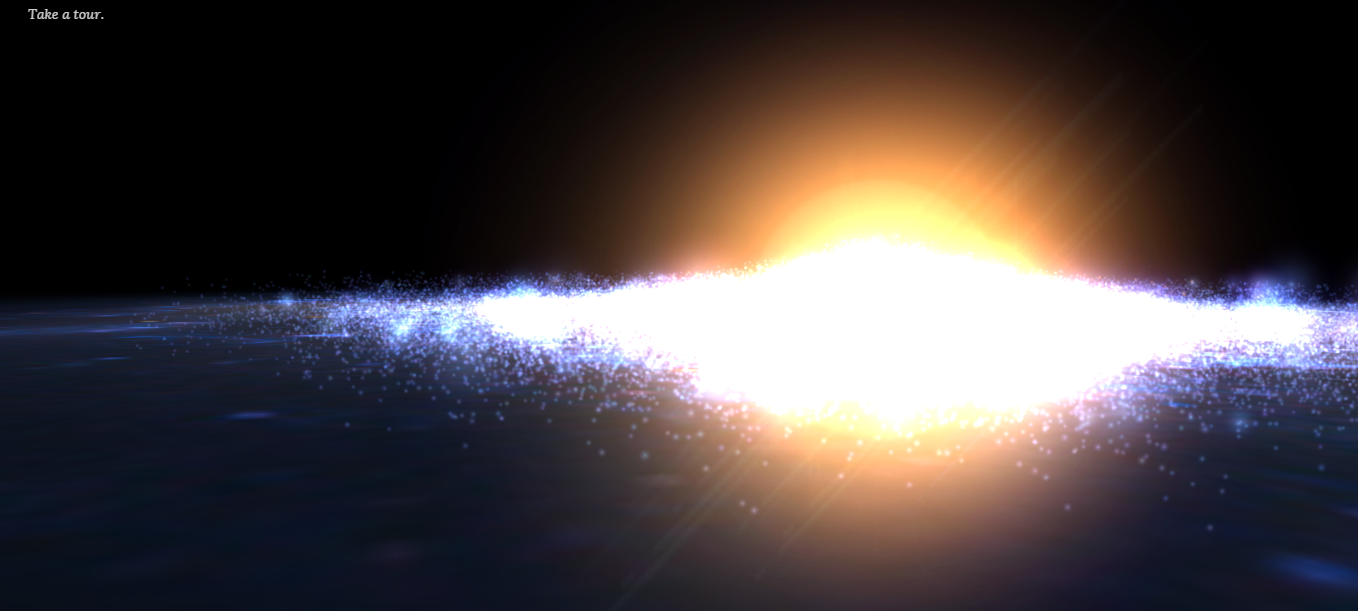
| Is it possible to add lens flare effects or, more intensely, a more saturated glowing effects to distant but bright galaxy/quasars/galactic cores?
For example I saw this hubble picture


and here is a website of 3D stars that presents the glowing effect I've mentioned when you zoom out
http://stars.chromeexperiments.com/

|
| |
| |
| MrSteve | Date: Tuesday, 08.09.2015, 05:36 | Message # 598 |
|
Observer
Group: Newbies
United States
Messages: 5
Status: Offline
| RE: Frame Packing 3D
SE,
I have not been able to build the windows of the proposed sizes 1920x2205 (or 1280x1485) in Win 7. The Airflex5D device only shows 1920x1080 max at 24Hz (the HDMI 1.4 spec) - but SE's vertical stereo pair mode DOES work with this device creating good 3D in perfect alignment but only at 1920x540 stretched to 1920x1080 ( it does NOT need the added 45 pixel offset to work in that mode). I don't seem to be able to test for FHD3D on my AlienWare 17 R4, just from BlueRay 3D players. Maybe when 4K PC systems are the norm next year this will work as proposed - thank you for your effort on this. Sorry to have wasted your time.
SU
If anyone has successfully used FHD3D 1920x1080 or larger in 3D from SE, please drop us a line about your setup?
|
| |
| |
| FastFourierTransform | Date: Friday, 11.09.2015, 15:27 | Message # 599 |
|
Pioneer
Group: Local Moderators
Spain
Messages: 542
Status: Offline
| Quote FastFourierTransform ( ) This instrument mapped by 2012 the 75% of the surface with a resolution of 6 meters per pixel!! By now it should probably have reached the complete coverage of the planet.
We have reached 6 meter per pixel resolution for global martian coverage (more than 90%)!!!!!
http://www.planetary.org/blogs....rs.html
One day soon on SE. Maybe :)
PS: Just a reminder of what can be done with those resolutions on a 3D render:
Edited by FastFourierTransform - Friday, 11.09.2015, 15:29 |
| |
| |
| PlutonianEmpire | Date: Friday, 11.09.2015, 20:31 | Message # 600 |
 Pioneer
Group: Users
United States
Messages: 475
Status: Offline
| I saw Rodrigo's terrain update for Ice World ice ridges today, and it gave me a idea for a suggestion. I think what might be nice would be to enhance upon it for terras and deserts, where while they would essentially use the same parameters in the surface tags (cracksOctaves, etc), on terras, they would appear as the default ridges undersea, but on land and on desert worlds, they could appear as a mixture as the ridges and lines of smaller volcanoes, like what we kinda see in Iceland, since the the tectonic separation ridge goes above gound there.
One thing that might help with the distribution of volcanoes along landlocked ridges versus isolated volcanoes (such as hotspots, like what we see in Hawaii, and in the current rendering of volcanoes in SE), would be a single additional parameter for the Surface tags, such as "volcanoFraction" or "volcanoDistribution", with a value range between 0 and 1, which would tell the procedural engine how many of the volcanoes it wanted to generate to put along side the ridges/cracks instead of by itself like normal.
I think this might possibly give an illusion of tectonic activity, until a better way of rendering tectonic plates can be figured out.
Specs: Dell Inspiron 5547 (Laptop); 8 gigabytes of RAM; Processor: Intel® Core™ i5-4210U CPU @ 1.70GHz (4 CPUs), ~2.4GHz; Operating System: Windows 7 Home Premium 64-bit; Graphics: Intel® HD Graphics 4400 (That's all there is :( )
Edited by PlutonianEmpire - Friday, 11.09.2015, 20:33 |
| |
| |
 ENG
ENG New site


 United States


 Croatia
  Brazil

 Spain
Spain 
 Russian Federation
  China
China