|
Bug Reports for Version 0.96
|
|
| SpaceEngineer | Date: Thursday, 05.07.2012, 19:52 | Message # 1 |
 Author of Space Engine
Group: Administrators
 Russian Federation
Messages: 4800
Status: Offline
| Please post here all of your reports about bugs or crashes in SpaceEngine. Attach to your message a screenshot (if possible) and a log file (it's called the "se.log" and is located in the SpaceEngine's directory). Only the log file will help me to understand your problem and find a solution.
*
|
| |
| |
| anonymousgamer | Date: Friday, 03.08.2012, 16:41 | Message # 271 |
 World Builder
Group: Global Moderators
 United States
Messages: 1011
Status: Offline
| I didn't know you could even do that.
Desktop: FX-8350 4.0 GHz, 8 GB DDR3 RAM, EVGA GeForce GTX 1080 FTW 8 GB, 2 TB HDD, 24 inch 1920x1080 screen
Laptop: Core i5 480M 2.66 GHz (turbo 2.93), 8 GB DDR3 RAM, AMD Radeon HD 6550m 1 GB, 640 GB HDD, 17.3 inch 1600x900 screen
|
| |
| |
| HarbingerDawn | Date: Friday, 03.08.2012, 17:12 | Message # 272 |
 Cosmic Curator
Group: Administrators
United States
Messages: 8717
Status: Offline
| In 0.96 you can simply save the place in the F6 menu, select the place you saved, and hit Copy. Then paste it on the forum 
In the older versions you had to manually go into the place.cfg file and copy the proper section. You can still do that in 0.96 of course, but it's no longer necessary.
All forum users, please read this!
My SE mods and addons
Phenom II X6 1090T 3.2 GHz, 16 GB DDR3 RAM, GTX 970 3584 MB VRAM
|
| |
| |
| j0KeR | Date: Friday, 03.08.2012, 20:24 | Message # 273 |
 Explorer
Group: Users
 Greece
Messages: 178
Status: Offline
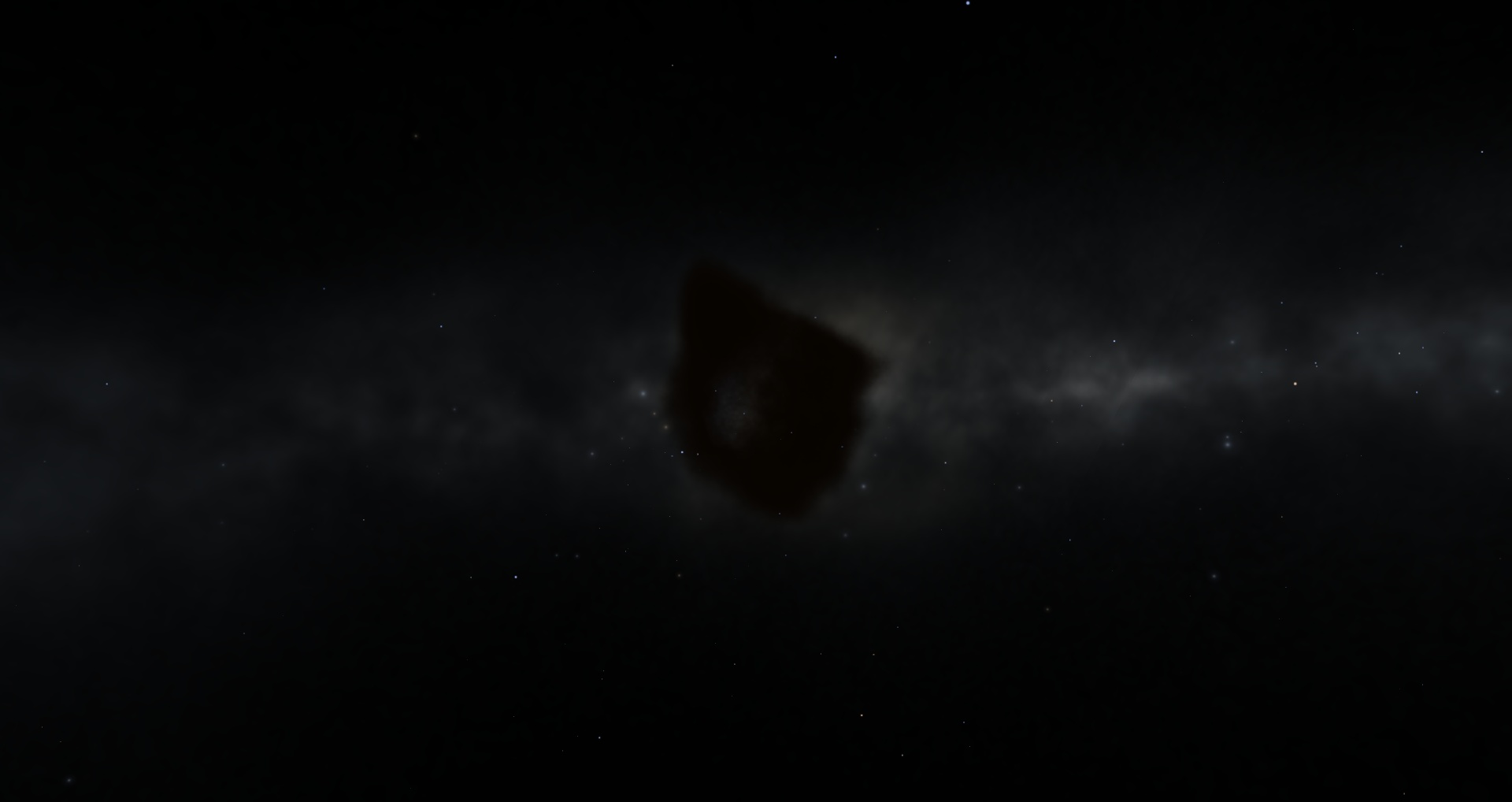
| There seems to be some bug or not rendering at all the Eagle Nebula i dont know ... it was fine until 0962, check it out


Also me se.log in case you need it
"Novus Ordo Seclorum"
Intel Core(E6850) 2 Duo 3.00 GHz \ Geforce GTX560 1024MB \ 4GB 667(MHz) 2 Channel RAM \ Windows 7 (32bit) \ Samsung SA700D 120hz (3D)
Edited by j0KeR - Friday, 03.08.2012, 20:26 |
| |
| |
| LevArris | Date: Friday, 03.08.2012, 21:34 | Message # 274 |
 Observer
Group: Users
 Germany
Messages: 12
Status: Offline
| Quote (HarbingerDawn) To ensure having no ring system, type NoRings true in your planet's definition.
That did the trick to get rid of the ring, thanks a lot!
The sea level is saved okay btw, so there are probably some conflicts with the planet surface parameters. I will find out :).
|
| |
| |
| neutronium76 | Date: Friday, 03.08.2012, 21:36 | Message # 275 |
 World Builder
Group: Users
Greece
Messages: 718
Status: Offline
| Quote (j0KeR) it was fine until 0962
No it wasn;t.. Check the 0961 look:


PC1:Core i7 970@3.34GHz, 6 cores/12 threads, 12GB DDR3 RAM@1.34GHz, 2x(SLI) GTX-580 GPUs 3GB VRAM(GDDR5)@1GHz, OS:Win7x64SP1
PC2:Core2Quad X9770@3.2GHz, 2 cores/4 threads 4GB DDR2 RAM@1GHz, GTX-285 GPU 1GB VRAM(DDR3)@1.24GHz, OS:WinVistax64SP2
|
| |
| |
| j0KeR | Date: Friday, 03.08.2012, 22:01 | Message # 276 |
|
Explorer
Group: Users
Greece
Messages: 178
Status: Offline
| Hmm i didnt notice it then ;p
Every other nebula is fine but this particular sprite has something .. wrong
"Novus Ordo Seclorum"
Intel Core(E6850) 2 Duo 3.00 GHz \ Geforce GTX560 1024MB \ 4GB 667(MHz) 2 Channel RAM \ Windows 7 (32bit) \ Samsung SA700D 120hz (3D)
|
| |
| |
| SpaceEngineer | Date: Friday, 03.08.2012, 23:45 | Message # 277 |
|
Author of Space Engine
Group: Administrators
Russian Federation
Messages: 4800
Status: Offline
| Quote (LevArris) BUT the new sea level seems to be ignored (it's same as in the original version). Besides, it magically has its original ring again ;-). Maybe I'm doing something fundamentally wrong? I tried deleting the cache in between, no change.
To disable rings, use what HarbingerDawn says. To define the sea level you should use the parameter "height" in the "Ocean" tag. The parameter "seaLevel" in the "Surface" tag and in the editor is an internal variable that's initialized from the Ocean's height and should not be used in the script.
Quote (LevArris) - Not a real bug, but pretty high annoyance level: the vertical scrollbar in the planet editor can't be "grabbed" when it's in the middle of the screen, because the universe map toolbar still pops out over it. You have to click somewere outside in the scroll area and then pick it :-).
Lock the toolbar first, then call the planet editor Or lock it and then click on the free place on the planet editor window.
*

|
| |
| |
| pete2831 | Date: Saturday, 04.08.2012, 15:36 | Message # 278 |
|
Observer
Group: Newbies
 United Kingdom
Messages: 2
Status: Offline
| I have just installed this game and updated to the latest patch and I cant even land on Earth. I have tried different ways of doing it. Can anyone help? Thanks
|
| |
| |
| HarbingerDawn | Date: Saturday, 04.08.2012, 16:04 | Message # 279 |
|
Cosmic Curator
Group: Administrators
United States
Messages: 8717
Status: Offline
| Hello pete2831, welcome to the forum.
Your log doesn't show any major problems (aside from the crash). I need more specifics about the problems you're having. What exactly happens when you try to land on Earth? How have you tried doing it? Et cetera.
Also, knowing what graphics settings you're using would be very helpful. If you can, take a screenshot of your graphics options (Ctrl-F4 in the program) and post it here.
All forum users, please read this!
My SE mods and addons
Phenom II X6 1090T 3.2 GHz, 16 GB DDR3 RAM, GTX 970 3584 MB VRAM
Edited by HarbingerDawn - Saturday, 04.08.2012, 16:04 |
| |
| |
| pete2831 | Date: Saturday, 04.08.2012, 17:29 | Message # 280 |
|
Observer
Group: Newbies
United Kingdom
Messages: 2
Status: Offline
| Thanks HarbingerDawn. The issue seems to have fixed itself after a few reloads.
|
| |
| |
| Sharpshooter | Date: Monday, 06.08.2012, 13:02 | Message # 281 |
|
Space Tourist
Group: Users
Greece
Messages: 26
Status: Offline
| It happens to me as well in few planets but lowering the galaxy magnitude ( wich lowers the nebulas' magnitude too ) solves the bug
|
| |
| |
| BlueMoon | Date: Wednesday, 08.08.2012, 15:34 | Message # 282 |
 Observer
Group: Users
United States
Messages: 19
Status: Offline
| Hello.
I just installed the new 0.9.6.2 patch. I descovered this bug not too long after I started playing space engine.

This transparency applies to every planet, star, and moon.
Is there a possible fix to this?
Edited by BlueMoon - Wednesday, 08.08.2012, 16:55 |
| |
| |
| DoctorOfSpace | Date: Wednesday, 08.08.2012, 15:40 | Message # 283 |
 Galaxy Architect
Group: Global Moderators
 Pirate
Messages: 3600
Status: Offline
| Whoa never seen that before, thats really trippy.
Intel Core i7-5820K 4.2GHz 6-Core Processor
G.Skill Ripjaws V Series 32GB (4 x 8GB) DDR4-2400 Memory
EVGA GTX 980 Ti SC 6GB
|
| |
| |
| apenpaap | Date: Wednesday, 08.08.2012, 16:44 | Message # 284 |
 World Builder
Group: Users
 Antarctica
Messages: 1063
Status: Offline
| Woah, that's really odd. XD
I occasionally stream at http://www.twitch.tv/magistermystax. Sometimes SE, sometimes other games.
|
| |
| |
| j0KeR | Date: Wednesday, 08.08.2012, 17:39 | Message # 285 |
|
Explorer
Group: Users
Greece
Messages: 178
Status: Offline
| The only place that i recall seeing this was my failed attemps at making a planet in photoshop in a background full of stars . Anyway that's REALLY odd did you play with any settings to see if there is any hope to solve this ?
"Novus Ordo Seclorum"
Intel Core(E6850) 2 Duo 3.00 GHz \ Geforce GTX560 1024MB \ 4GB 667(MHz) 2 Channel RAM \ Windows 7 (32bit) \ Samsung SA700D 120hz (3D)
|
| |
| |
 ENG
ENG New site


 Russian Federation


 United States
 Greece
 Germany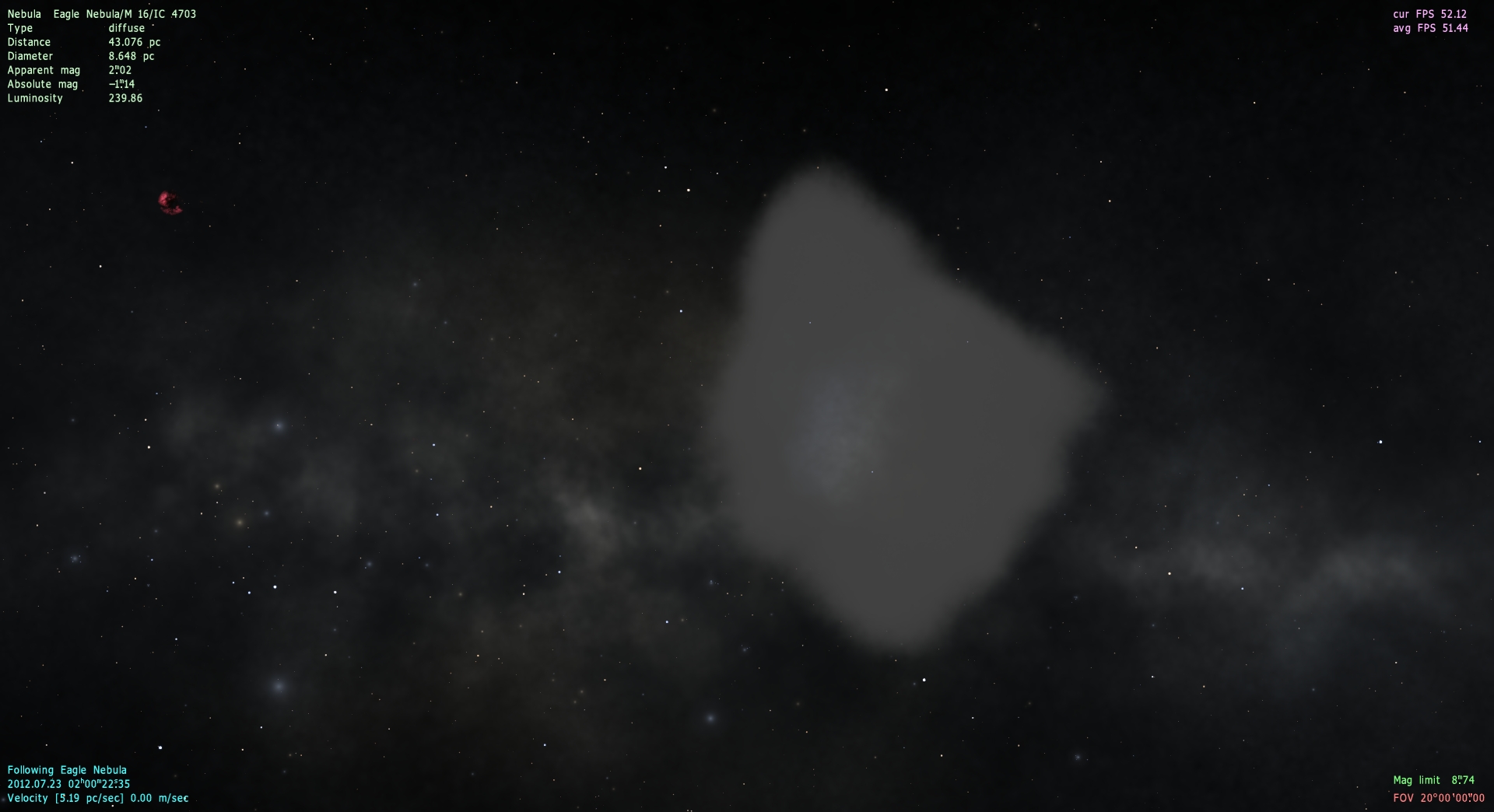

 United Kingdom
 Pirate
  Antarctica