|
Work progress and public beta test - 0.9.7.4
|
|
| JackDole | Date: Monday, 18.07.2016, 16:36 | Message # 3106 |
 Star Engineer
Group: Local Moderators
 Germany
Messages: 1742
Status: Offline
| Quote admiralsirjohn (  ) When putting custom textures on a planet, can they be done as cylindrical/spherical projected .png
You can use cylindrical textures, in this form:
Code
Surface
{
DiffMap "surface_diff.*"
DiffMapAlpha "Water"
BumpMap "surface_bump.*"
BumpHeight 19.475
BumpOffset 10.896
GlowMap "night_light.*"
GlowMode "Night"
GlowColor (1.00 0.90 0.66)
GlowBright 1.0
}
But if you want higher resolutions and real bump mapping, you should use CubeMaps.
How this works is described here: MOD - Creating custom textures for planets 0.97
There you will find also the necessary tools.
Don't forget to look here.

|
| |
| |
| admiralsirjohn | Date: Monday, 18.07.2016, 18:29 | Message # 3107 |
 Astronaut
Group: Users
 Pirate
Messages: 64
Status: Offline
| Okay, thanks. I probably won't need super-high resolution, so cylindrical maps should work fine.
I assume since it's not listed, I won't need an actual surface color map?
John H. Harris
Lightwave user, Trekkie, and wannabe Hugo Award winner.
(Ah, who am I kidding...?)
|
| |
| |
| JackDole | Date: Monday, 18.07.2016, 19:06 | Message # 3108 |
|
Star Engineer
Group: Local Moderators
Germany
Messages: 1742
Status: Offline
| You need a 'surface_diff' map, like this:

A bump map would also be good. But is not necessary.
Also you should set 'NoOcean true', otherwise it may happen, the planet will be flooded. If it is a 'Terra'.
Code
Surface
{
DiffMap "surface_diff.*"
DiffMapAlpha "Water"
BumpMap "surface_bump.*"
}
NoOcean true
Don't forget to look here.
|
| |
| |
| admiralsirjohn | Date: Monday, 18.07.2016, 19:12 | Message # 3109 |
|
Astronaut
Group: Users
Pirate
Messages: 64
Status: Offline
| Ah, okay. That's what Lightwave calls a surface color map. I was thinking an alpha map combined with a bump map would allow for a semi-procedural ground texture. Thanks for the clarification.
I'll be putting this one on Intar:

With this bump map:

And this city lights map:

I'll use the default/procedural textures for the atmosphere.
John H. Harris
Lightwave user, Trekkie, and wannabe Hugo Award winner.
(Ah, who am I kidding...?)
Edited by admiralsirjohn - Monday, 18.07.2016, 19:16 |
| |
| |
| admiralsirjohn | Date: Monday, 18.07.2016, 19:58 | Message # 3110 |
|
Astronaut
Group: Users
Pirate
Messages: 64
Status: Offline
| Doesn't seem to be working...

John H. Harris
Lightwave user, Trekkie, and wannabe Hugo Award winner.
(Ah, who am I kidding...?)
Edited by admiralsirjohn - Monday, 18.07.2016, 20:00 |
| |
| |
| JackDole | Date: Monday, 18.07.2016, 20:18 | Message # 3111 |
|
Star Engineer
Group: Local Moderators
Germany
Messages: 1742
Status: Offline
| For me it works!
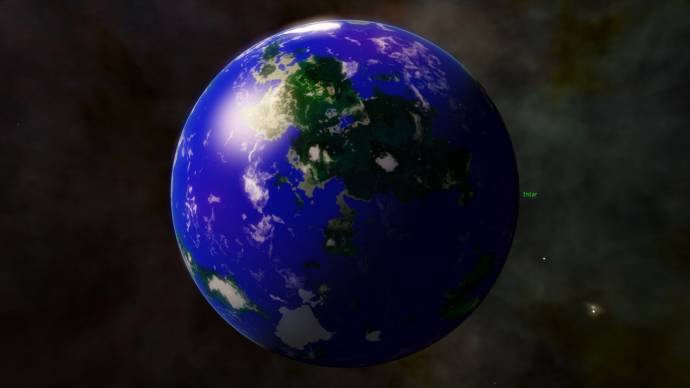
The textures should always be powers of 2 !
For example, 1024 x 512 or 2048 x 1024.
Don't forget to look here.
|
| |
| |
| admiralsirjohn | Date: Monday, 18.07.2016, 20:23 | Message # 3112 |
|
Astronaut
Group: Users
Pirate
Messages: 64
Status: Offline
| Ah, okay. I'll have to resize.
Thanks again!
John H. Harris
Lightwave user, Trekkie, and wannabe Hugo Award winner.
(Ah, who am I kidding...?)
|
| |
| |
| admiralsirjohn | Date: Monday, 18.07.2016, 20:39 | Message # 3113 |
|
Astronaut
Group: Users
Pirate
Messages: 64
Status: Offline
| Still not working for me. I think I messed up the code a bit...
Code Planet "Intar/Intar Stelis 4"
{
ParentBody "Intar Stelis"
Class "Terra"
Mass 1.516
Radius 7300.699
InertiaMoment 0.3299899
Oblateness 0.01161207
RotationPeriod 27.12
Obliquity 26
EqAscendNode 282.4939
Albedo 0.3570188
Brightness 2
Color (0.711 0.753 0.970)
Life
{
Class "Organic"
Type "Multicellular"
Biome "Terrestrial"
Panspermia "true"
}
Surface
{
DiffMap "Intar-land.png"
DiffMapAlpha "Water"
BumpMap "Intar-bump.png"
BumpHeight 19.475
BumpOffset 10.896
GlowMap "Intar-cities.png"
GlowMode "Night"
GlowColor (1.00 0.90 0.66)
GlowBright 1.0
}
Clouds
{
Height 1.984863
BumpHeight 6.165912
Hapke 0.2
SpotBright 2
SpotWidth 0.15
DayAmbient 2
mainFreq 1.060631
mainOctaves 10
Coverage 0.2616979
twistZones 2.007983
twistMagn 0
}
NoLava true
Atmosphere
{
Model "Earth"
Height 58.51548
Density 0.3657133
Pressure 1.13
Bright 12.96069
Opacity 1
SkyLight 4.32023
}
Aurora
{
Height 180.224
NorthLat 75.07257
NorthLon 151.2161
NorthRadius 2116.763
NorthWidth 1939.483
NorthRings 4
NorthBright 0.3
NorthParticles 50000
SouthLat -90
SouthLon 328.6011
SouthRadius 1993.161
SouthWidth 1209.058
SouthRings 6
SouthBright 0.3
SouthParticles 50000
TopColor (1.000 1.000 1.000)
BottomColor (0.000 1.000 0.000)
}
NoRings true
NoCometTail true
NoOcean true
Orbit
{
SemiMajorAxis 1.074
Period 1.3429
Eccentricity 0.008
Inclination 0
AscendingNode 283.9248
ArgOfPericenter 56.67492
MeanAnomaly 225.9741
RefPlane "Ecliptic"
}
}
John H. Harris
Lightwave user, Trekkie, and wannabe Hugo Award winner.
(Ah, who am I kidding...?)
|
| |
| |
| JackDole | Date: Monday, 18.07.2016, 21:29 | Message # 3114 |
|
Star Engineer
Group: Local Moderators
Germany
Messages: 1742
Status: Offline
| For me it works.

Do you have the textures in the folder 'addons\textures\planets'?
They can also be in 'data\textures\planets', but better is the first version.
In addition, the names of the files are case sensitive. You must pay close attention to uppercase and lowercase in the name of the textures.
Don't forget to look here.
|
| |
| |
| admiralsirjohn | Date: Monday, 18.07.2016, 21:37 | Message # 3115 |
|
Astronaut
Group: Users
Pirate
Messages: 64
Status: Offline
| I have them in 'data\textures\planets'.
Let me copy them into addons, and I'll report back.
John H. Harris
Lightwave user, Trekkie, and wannabe Hugo Award winner.
(Ah, who am I kidding...?)
|
| |
| |
| admiralsirjohn | Date: Monday, 18.07.2016, 21:40 | Message # 3116 |
|
Astronaut
Group: Users
Pirate
Messages: 64
Status: Offline
| Nope. Still nothing. 
John H. Harris
Lightwave user, Trekkie, and wannabe Hugo Award winner.
(Ah, who am I kidding...?)
|
| |
| |
| JackDole | Date: Monday, 18.07.2016, 22:27 | Message # 3117 |
|
Star Engineer
Group: Local Moderators
Germany
Messages: 1742
Status: Offline
| Are all the other planets working?
Do you have any error messages in the console, or in the se.log file?
Don't forget to look here.
|
| |
| |
| admiralsirjohn | Date: Monday, 18.07.2016, 22:45 | Message # 3118 |
|
Astronaut
Group: Users
Pirate
Messages: 64
Status: Offline
| There are a couple of errors, but the textures I specified aren't even showing up in the log.
Code [MT] "data/catalogs/StarTrek.pak/stars/TrekStars.sc" line 95: ERROR: Star "Intar Stelis" no RA value, random value 12.7204 assigned
[MT] "data/catalogs/StarTrek.pak/stars/TrekStars.sc" line 95: ERROR: Star "Intar Stelis" no Dec value, random value 80.0058 assigned
[MT] "data/catalogs/StarTrek.pak/stars/TrekStars.sc" line 95: ERROR: Star "Intar Stelis" can't compute distance, random value 466.868 assigned
Those are the only errors relating to the Intar system.
All the other planets use default textures, and they're working fine.
John H. Harris
Lightwave user, Trekkie, and wannabe Hugo Award winner.
(Ah, who am I kidding...?)
Edited by admiralsirjohn - Monday, 18.07.2016, 22:55 |
| |
| |
| JackDole | Date: Monday, 18.07.2016, 23:54 | Message # 3119 |
|
Star Engineer
Group: Local Moderators
Germany
Messages: 1742
Status: Offline
| Then I do not know.
What you could still try - make at the end of the name only '.*' instead of '.png'.
Code
DiffMap "Intar-land.*"
...
BumpMap "Intar-bump.*"
...
GlowMap "Intar-cities.*"
I do not think that makes a difference, but you never know!
Don't forget to look here.
|
| |
| |
| admiralsirjohn | Date: Tuesday, 19.07.2016, 00:00 | Message # 3120 |
|
Astronaut
Group: Users
Pirate
Messages: 64
Status: Offline
| Worth a shot. I tried putting them inside the TrekStars addon (since it's in the same general universe), but that didn't work.
I'll report back momentarily.
EDIT: Still nothing. Looks like I'll have to try the cubic projection route...
John H. Harris
Lightwave user, Trekkie, and wannabe Hugo Award winner.
(Ah, who am I kidding...?)
Edited by admiralsirjohn - Tuesday, 19.07.2016, 00:04 |
| |
| |
 ENG
ENG New site


 Germany


 Pirate


