|
Work progress and public beta test - 0.9.7.4
|
|
| Idgelios | Date: Saturday, 14.05.2016, 19:10 | Message # 2551 |
 Astronaut
Group: Users
 United States
Messages: 77
Status: Offline
| Will there be a density slider for planemos like there is for procedural stars?
|
| |
| |
| HarbingerDawn | Date: Saturday, 14.05.2016, 23:15 | Message # 2552 |
 Cosmic Curator
Group: Administrators
United States
Messages: 8717
Status: Offline
| Quote Idgelios (  ) Will there be a density slider for planemos like there is for procedural stars?
What density slider is there for procedural stars?
All forum users, please read this!
My SE mods and addons
Phenom II X6 1090T 3.2 GHz, 16 GB DDR3 RAM, GTX 970 3584 MB VRAM
|
| |
| |
| JackDole | Date: Saturday, 14.05.2016, 23:54 | Message # 2553 |
 Star Engineer
Group: Local Moderators
 Germany
Messages: 1742
Status: Offline
| Quote HarbingerDawn ( ) Quote Idgelios ()
Will there be a density slider for planemos like there is for procedural stars?
What density slider is there for procedural stars?
Maybe Idgelios thinks of this sliders:

Don't forget to look here.

|
| |
| |
| Idgelios | Date: Sunday, 15.05.2016, 01:35 | Message # 2554 |
|
Astronaut
Group: Users
United States
Messages: 77
Status: Offline
| I'm talking about the procedural star density modifier in the Universe.cfg.
|
| |
| |
| sinsforeal | Date: Sunday, 15.05.2016, 02:24 | Message # 2555 |
 Space Pilot
Group: Users
United States
Messages: 129
Status: Offline
| JackDole, Idgelios, Jack is correct that was what he was referring to harbingerdawn. So Idgelios There will be no need for a slider because it already exists, Its called "planet brightness"
"Man once looked up at the stars and wondered, Now all we do is look at our hands and hesitate"
|
| |
| |
| HarbingerDawn | Date: Sunday, 15.05.2016, 06:00 | Message # 2556 |
|
Cosmic Curator
Group: Administrators
United States
Messages: 8717
Status: Offline
| Quote sinsforeal ( ) Jack is correct that was what he was referring to harbingerdawn.
No, that's not was he was talking about, as he himself said:
Quote Idgelios ( ) I'm talking about the procedural star density modifier in the Universe.cfg.
And that's a config value, not a slider.
All forum users, please read this!
My SE mods and addons
Phenom II X6 1090T 3.2 GHz, 16 GB DDR3 RAM, GTX 970 3584 MB VRAM
|
| |
| |
| Idgelios | Date: Sunday, 15.05.2016, 14:54 | Message # 2557 |
|
Astronaut
Group: Users
United States
Messages: 77
Status: Offline
| To specific I am referring to the StarGalaxyDensity parameter and if there will be a configuration option like the StarGalaxyDensity parameter for Planemos.
|
| |
| |
| JCandeias | Date: Sunday, 15.05.2016, 16:35 | Message # 2558 |
 Pioneer
Group: Translators
 Portugal
Messages: 387
Status: Offline
| Hi. It's been a while.
I have, with RC2, the same problem OBV10U3_NINJA had back in november (see message #703 in this thread), but in my case there's no cache deleting and reloading the program that works. The planetary textures are missing from all major planets, although Pluto and Ceres, at least, do show their textures. Earth, for instance, is like this:
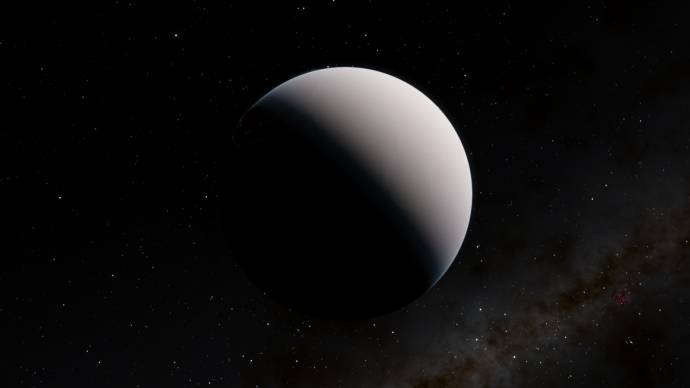
Checking se.log, I don't see anything obviously wrong, so I'm stumped. I'm attaching it anyway. It isn't a localization issue: I've tried the program in English and Earth is still a white ball.
They let me use this!
|
| |
| |
| Bambusman | Date: Sunday, 15.05.2016, 16:52 | Message # 2559 |
 Pioneer
Group: SE team
Germany
Messages: 408
Status: Offline
| JCandeias, did you downloaded any texture addons for earth? if yes you probably installed them wrong
|
| |
| |
| JackDole | Date: Sunday, 15.05.2016, 17:27 | Message # 2560 |
|
Star Engineer
Group: Local Moderators
Germany
Messages: 1742
Status: Offline
| JCandeias, Quote JCandeias ( ) The planetary textures are missing from all major planets, although Pluto and Ceres, at least, do show their textures. Earth, for instance, is like this:
Remove temporary file 'myaddons.pak' from your SpaceEngine installation folder, and test SpaceEngine then. It may be that there lies the problem.
Remove the file completely from the SpaceEngine directory. It is not enough to move it within SpaceEngine.
Don't forget to look here.
|
| |
| |
| JCandeias | Date: Sunday, 15.05.2016, 18:49 | Message # 2561 |
|
Pioneer
Group: Translators
Portugal
Messages: 387
Status: Offline
| Quote Bambusman ( ) JCandeias, did you downloaded any texture addons for earth? if yes you probably installed them wrong
Nope: fresh installation, not a single addon with their own textures.
Quote JackDole ( ) Remove temporary file 'myaddons.pak' from your SpaceEngine installation folder, and test SpaceEngine then. It may be that there lies the problem.
Yes, planetary textures do show up if I do that. It's weird, though: I have nothing in that .pak file that has anything to do with textures... just stars' and planets' definitions, and nothing different from what I had in previous versions of the engine and which didn't cause any significant issues.
Edit:
And I just noticed that removing or putting myaddons.pak back in place changes the position of the Earth by more than 1 AU. This is truly bizarre.
They let me use this!
Edited by JCandeias - Sunday, 15.05.2016, 18:52 |
| |
| |
| JackDole | Date: Sunday, 15.05.2016, 19:22 | Message # 2562 |
|
Star Engineer
Group: Local Moderators
Germany
Messages: 1742
Status: Offline
| JCandeias,
the scripts in your .pak file change a whole range of existing objects, including the earth.
I think that with these changes something is not quite right.
Don't forget to look here.
|
| |
| |
| JCandeias | Date: Sunday, 15.05.2016, 19:45 | Message # 2563 |
|
Pioneer
Group: Translators
Portugal
Messages: 387
Status: Offline
| Quote JackDole ( ) the scripts in your .pak file change a whole range of existing objects, including the earth.
I'm aware of that. They shouldn't change the position, though, because that's defined in Earth's catalog entry. The fact that they change Earth's position means there's a bug lurking somewhere.
And I just kinda found out where: I had commented out a couple of brown dwarfs that were contaminating their parent stars, turning them into identical brown dwarfs (which is another bug), and didn't comment out their planets as well, which gives rise to errors in planet hierarchy, because those planets are left with unknown parent objects. For some reason, that screws up a lot of stuff. I tried commenting out the planets as well, and the Earth got back to its proper place, wearing its proper textures.
So yeah, the program is now less idiot-proof than it used to be.
They let me use this!
|
| |
| |
| JCandeias | Date: Sunday, 15.05.2016, 20:41 | Message # 2564 |
|
Pioneer
Group: Translators
Portugal
Messages: 387
Status: Offline
| Quote JCandeias ( ) And I just kinda found out where
Ugh! Forget it: I didn't. I had simply forgotten to rename myaddons.pak back from myaddons.zip after editing those files. Editing out the orphan planets didn't do any good.
They let me use this!
|
| |
| |
| JackDole | Date: Sunday, 15.05.2016, 21:05 | Message # 2565 |
|
Star Engineer
Group: Local Moderators
Germany
Messages: 1742
Status: Offline
| JCandeias,
you could remove the files 'Asteroids.sc' and 'SolarSys.sc' from the .pak archive, maybe also 'SolarSys3000.sc', and see what is then.
Perhaps, one by one, to see which is the cause. If it is one of these files.
Don't forget to look here.
|
| |
| |
 ENG
ENG New site


 United States


 Germany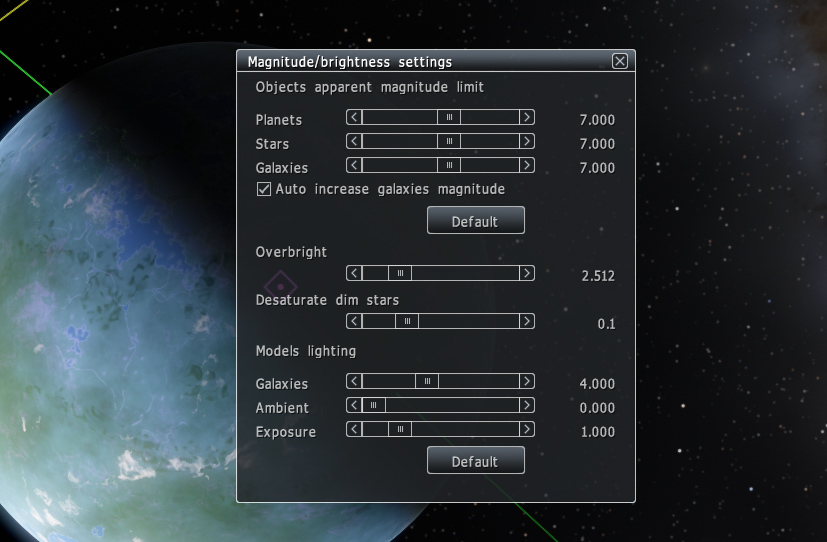

 Portugal
