|
Work progress and public beta test - 0.9.7.4
|
|
| Mosfet | Date: Friday, 01.01.2016, 14:40 | Message # 1096 |
 World Builder
Group: Users
 Italy
Italy
Messages: 754
Status: Offline
| Quote Retsof (  ) So could a "ship" that looks like a building, or even a city, be placed on the surface for cool scenes now?
Same reasoning here, I bet someone will try that very soon.
I managed to use a workstation for a couple of hours yesterday, some i7 with Nvidia Quadro and 16GB RAM, and the patch worked with no flaws for what I tried, except that some notable procedural places were no more available.
Sagittarius A is gorgeous.
happy new year to all and to you SpaceEngineer!
"Time is illusion. Lunchtime doubly so."
Douglas N. Adams
My mods
Asus x555ub: cpu i5-6200u - ram 4gb - gpu nvidia geforce 940m 2gb vram
|
| |
| |
| r3dw1ng | Date: Friday, 01.01.2016, 15:38 | Message # 1097 |
|
Observer
Group: Newbies
 France
Messages: 4
Status: Offline
| I have a strange issue, I am at LOD 0.9 and the loading time of the clouds is much longer than the loading time of the land. I have tried both loading systems, my video ram is almost full (4gb), and in some places I have endless loads.
|
| |
| |
| Lynk101 | Date: Friday, 01.01.2016, 15:46 | Message # 1098 |
|
Space Tourist
Group: Users
 United States
Messages: 26
Status: Offline
| Quote Lynk101 ( ) Fair enough. It didnt come with a log, I moved, copied and replaced the space engine files with the new one. The version I had was an earlier version of 0.9.7.4 (patch 07). Patch 07 after installing patch 08 remained the same
Is there any more information you need?
|
| |
| |
| huishb | Date: Friday, 01.01.2016, 17:10 | Message # 1099 |
 Astronaut
Group: Users
 Pirate
Messages: 72
Status: Offline
| Spaceengineer, I have a question regarding the accretion disks. I've noticed that the accretion disks look different in the development pictures. The ones in the pictures look more cloudy and get more wispy at the center...but in the patch release they look stretched like rings around a planet. Why is this? Or maybe it's just the ones I saw, maybe there are different textures? Also, are they animated? When I was studying Sagittarius *A, I think I saw the accretion disk change. Am I wrong? Or are they animated?
Possessor: AMD FX™-4100 Quad-Core Possessor (CPUs), ~3.6 GHz
Memory: 8192MB RAM. Graphics Card: NVIDIA GeForce GT 610. Approx total memory: 4045 MB
|
| |
| |
| n0b0dy | Date: Friday, 01.01.2016, 19:21 | Message # 1100 |
 Explorer
Group: Users
Pirate
Messages: 297
Status: Offline
| Is it possible to disable/enable the shipwarp effect with a console command?
Edited by n0b0dy - Friday, 01.01.2016, 19:22 |
| |
| |
| PlutonianEmpire | Date: Friday, 01.01.2016, 19:46 | Message # 1101 |
 Pioneer
Group: Users
United States
Messages: 475
Status: Offline
| Quote Rigel ( ) 2. It is impossible to move to the speed limit.
For example
If the speed limit is 100 ly/s, I can only moving half as much as it (about 50 ly/s).
Hmm. I think fixing this somehow unfixed this same issue that was previously occurring in Airplane mode. In Patch 7, Airplane mode had a consistent speed limit. In patch 8, this is no longer true, where free mode now has that consistent speed. Is it possible to fix this issue for both Free mode and Aircraft mode, so they both maintain consistency in keeping to the speed limits?
Specs: Dell Inspiron 5547 (Laptop); 8 gigabytes of RAM; Processor: Intel® Core™ i5-4210U CPU @ 1.70GHz (4 CPUs), ~2.4GHz; Operating System: Windows 7 Home Premium 64-bit; Graphics: Intel® HD Graphics 4400 (That's all there is :( )
|
| |
| |
| RedRuin | Date: Friday, 01.01.2016, 19:47 | Message # 1102 |
|
Space Tourist
Group: Users
United States
Messages: 34
Status: Offline
| Lynk101, Look in your "system" directory in your SE instillation. A log file is created and overwritten every time you launch SE, so the file is probably in there. It should look something like the image attached:
|
| |
| |
| the_nerervarine | Date: Friday, 01.01.2016, 20:09 | Message # 1103 |
|
Space Pilot
Group: Users
United States
Messages: 106
Status: Offline
| I found this galaxy with more nebula then stars.
*Edit
As soon as a started Space Engine again all the nebula were gone and the galaxy seemed properly populated again.
AMD FX-8320 8 core @4.0ghz , AMD R9 290 4GB, 8GB DDR3 @1866mhz, 1TB Hard Drive
Edited by the_nerervarine - Friday, 01.01.2016, 20:14 |
| |
| |
| PlutonianEmpire | Date: Friday, 01.01.2016, 21:22 | Message # 1104 |
|
Pioneer
Group: Users
United States
Messages: 475
Status: Offline
| Earlier in this thread, I posted about a long-standing "jump" bug. I mention it because during my travels, I decided to investigate one of them, and I noticed it seems to be due to extremely thin, invisible wals, of varying heights it seems, at the edges of some procedural tiles. Does anyone know what causes these "invisible walls"? 
Specs: Dell Inspiron 5547 (Laptop); 8 gigabytes of RAM; Processor: Intel® Core™ i5-4210U CPU @ 1.70GHz (4 CPUs), ~2.4GHz; Operating System: Windows 7 Home Premium 64-bit; Graphics: Intel® HD Graphics 4400 (That's all there is :( )
|
| |
| |
| DarkenTerra | Date: Saturday, 02.01.2016, 03:23 | Message # 1105 |
 Astronaut
Group: Users
 China
China
Messages: 45
Status: Offline
| My SE crashed when I started to control a spaceship around a black hole with an accretion disk, and it happend again and again  WHY?? WHY??
Who am I ?
|
| |
| |
| parameciumkid | Date: Saturday, 02.01.2016, 03:25 | Message # 1106 |
 Explorer
Group: Users
United States
Messages: 277
Status: Offline
| Probably because you didn't include any details or crash logs in your post just now ;P
Intel HD Graphics 4000 ;P
|
| |
| |
| DarkenTerra | Date: Saturday, 02.01.2016, 03:55 | Message # 1107 |
|
Astronaut
Group: Users
China
Messages: 45
Status: Offline
| Quote parameciumkid ( ) Probably because you didn't include any details or crash logs in your post just now ;P
I can't see any crash logs when it crashed, everything I could see before SE crashed was just the game stopped running Then next thing I could see is just a window that told me SE was crashed, there was no details!
Is this a bug or some thing?or just because my computer configuration is too low??
Who am I ?
|
| |
| |
| DoctorOfSpace | Date: Saturday, 02.01.2016, 04:13 | Message # 1108 |
 Galaxy Architect
Group: Global Moderators
Pirate
Messages: 3600
Status: Offline
| Quote DarkenTerra ( ) Is this a bug or some thing?or just because my computer configuration is too low??
Could be, the new features are still in development.
Quote DarkenTerra ( ) I can't see any crash logs when it crashed
In the system folder there is a log file named SE.txt
Intel Core i7-5820K 4.2GHz 6-Core Processor
G.Skill Ripjaws V Series 32GB (4 x 8GB) DDR4-2400 Memory
EVGA GTX 980 Ti SC 6GB
|
| |
| |
| Canleskis | Date: Saturday, 02.01.2016, 05:24 | Message # 1109 |
|
Space Pilot
Group: Users
France
Messages: 117
Status: Offline
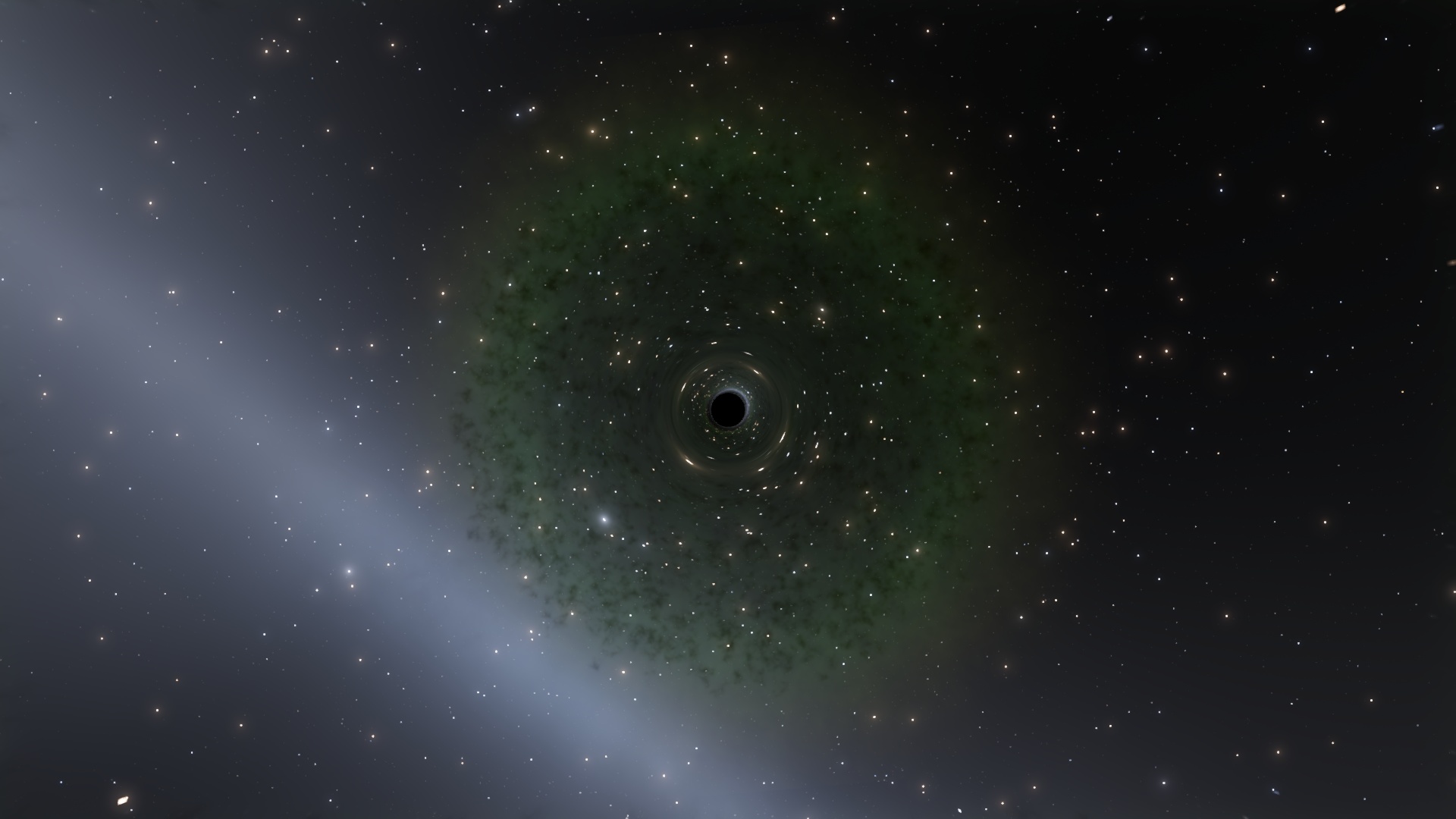
| I guess that's a but so I will put it here...
What's this weird green thing?

|
| |
| |
| Eliam | Date: Saturday, 02.01.2016, 11:01 | Message # 1110 |
|
Observer
Group: Users
France
Messages: 11
Status: Offline
| Not sure if it's a bug or not but 14 stars orbiting around a supermassive black hole is by far the biggest system I've seen or heard of in SE

Edited by Eliam - Saturday, 02.01.2016, 11:06 |
| |
| |
 ENG
ENG New site


 Italy
Italy 


 France
  United States
  Pirate
  China
China