|
Work progress and public beta test - 0.9.7.4
|
|
| gazelle | Date: Thursday, 08.10.2015, 12:14 | Message # 586 |
|
Astronaut
Group: Users
 Korea
Korea
Messages: 51
Status: Offline
| I'm window 8, and I use intell HD graphics. Also, it worked well in 0.9.7.3....
|
| |
| |
| JackDole | Date: Thursday, 08.10.2015, 12:29 | Message # 587 |
 Star Engineer
Group: Local Moderators
 Germany
Messages: 1742
Status: Offline
| Quote gazelle (  ) I'm window 8, and I use intell HD graphics
Quote SpaceEngineer ( ) I probably found the problem with Intel HD, patch will be soon.
Then you have to wait until SpaceEngineer solves the problem ...
Don't forget to look here.

|
| |
| |
| gazelle | Date: Thursday, 08.10.2015, 13:11 | Message # 588 |
|
Astronaut
Group: Users
Korea
Messages: 51
Status: Offline
| OHHH!!! It works!!!! Thank you so much!!!
|
| |
| |
| parameciumkid | Date: Thursday, 08.10.2015, 19:34 | Message # 589 |
 Explorer
Group: Users
 United States
Messages: 277
Status: Offline
| Quote SpaceEngineer ( ) I probably found the problem with Intel HD.

Quote SpaceEngineer ( ) To bypass that, you may disable reversed z-buffer now in main.cfg:
DepthBufferMode 0
But if it got switched to 1 automatically, it may not help...

Quote SpaceEngineer ( ) patch will be soon.
Intel HD Graphics 4000 ;P
Edited by parameciumkid - Thursday, 08.10.2015, 19:34 |
| |
| |
| PlutonianEmpire | Date: Friday, 09.10.2015, 00:08 | Message # 590 |
 Pioneer
Group: Users
United States
Messages: 475
Status: Offline
| Quote SpaceEngineer ( ) I probably found the problem with Intel HD, patch will be soon. To bypass that, you may disable reversed z-buffer now in main.cfg:
DepthBufferMode 0
But if it got switched to 1 automatically, it may not help...
Added: Also, dwarf galaxies are fixed now, all of them.
Not at first. When it auto-switched back to 1, I loaded it up, got the blank space, quit, re-reset the DepthBufferMode back to 0 made SE work again, so the auto-switch appears to be a one time thing upon first installing. 
But since you're working on patch, that will be big help.
Specs: Dell Inspiron 5547 (Laptop); 8 gigabytes of RAM; Processor: Intel® Core™ i5-4210U CPU @ 1.70GHz (4 CPUs), ~2.4GHz; Operating System: Windows 7 Home Premium 64-bit; Graphics: Intel® HD Graphics 4400 (That's all there is :( )
|
| |
| |
| SlamminKhan | Date: Friday, 09.10.2015, 14:26 | Message # 591 |
|
Observer
Group: Users
United States
Messages: 12
Status: Offline
| Quote SpaceEngineer ( ) I probably found the problem with Intel HD, patch will be soon. To bypass that, you may disable reversed z-buffer now in main.cfg:
DepthBufferMode 0
I could get past the startup window but when the program was fully loaded and the actual game window popped up it crashed  Added (09.10.2015, 14:26)
---------------------------------------------
Is there a way to prevent the program from making the program automatically change the DepthBufferMode to 1?
|
| |
| |
| gazelle | Date: Friday, 09.10.2015, 15:15 | Message # 592 |
|
Astronaut
Group: Users
Korea
Messages: 51
Status: Offline
| The Earth, Saturn, Mars, Moon, and Jupiter...(etc) looks strange. Typically the earth looks like a water planet. There are only clouds and water, and it keeps blinking weirdly when I move. This bug was from 0.9.7.3. I think this MUST be fixed right now. Here is my log file.
|
| |
| |
| JackDole | Date: Friday, 09.10.2015, 16:30 | Message # 593 |
|
Star Engineer
Group: Local Moderators
Germany
Messages: 1742
Status: Offline
| Found this:
DepthBufferMode 1

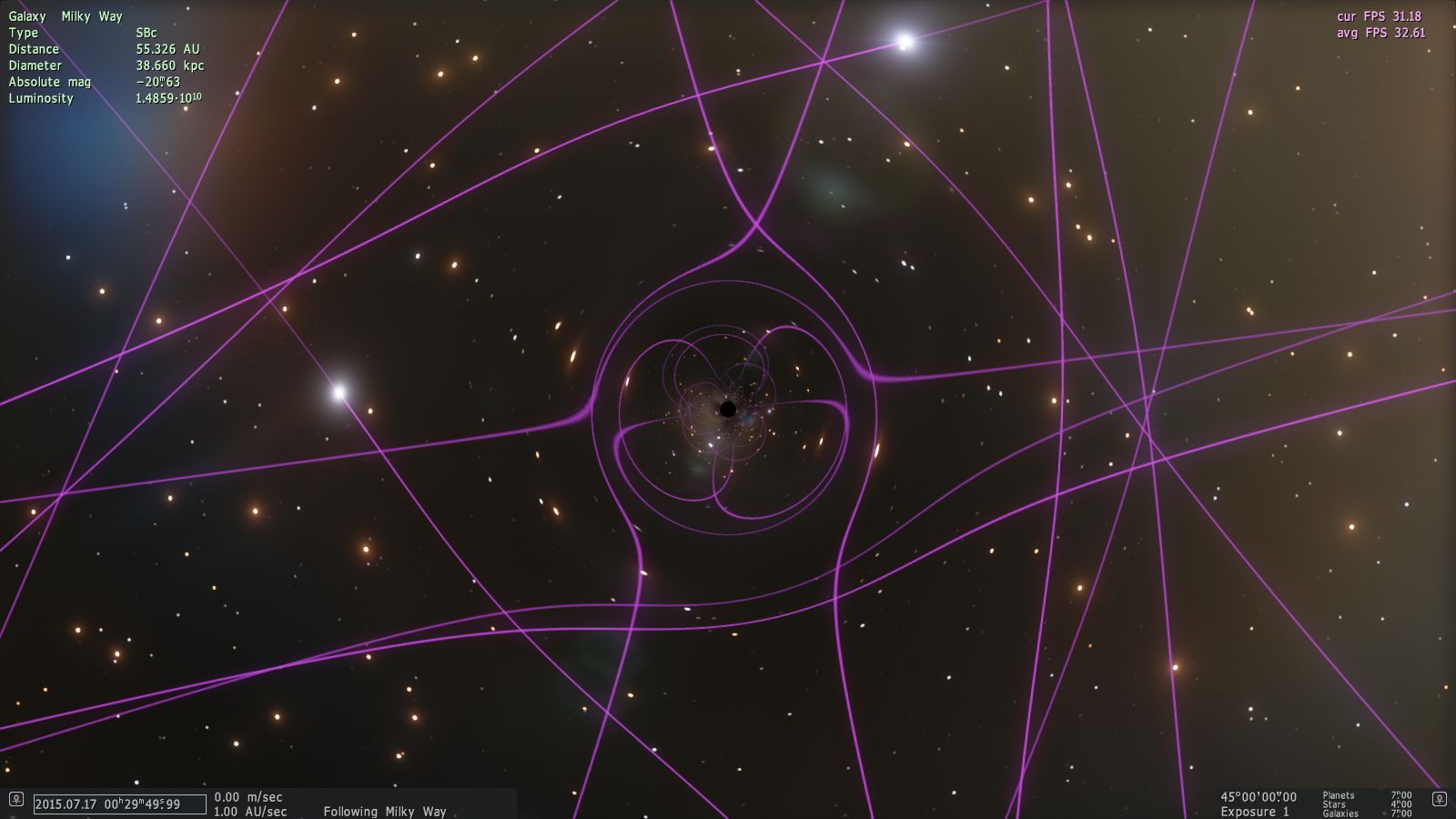
DepthBufferMode 0

Maybe the same problem as stars visible behind a black hole.
Don't forget to look here.
|
| |
| |
| n0b0dy | Date: Friday, 09.10.2015, 17:07 | Message # 594 |
 Explorer
Group: Users
 Pirate
Messages: 297
Status: Offline
| Quote JackDole ( ) Found this
This is actually not that bad: it helps navigate when close to black holes.
I agree however that stars visible behind black hole is immersion breaking.
Anyway Space Engineer is aware about all this and a patch will be out soon
|
| |
| |
| parameciumkid | Date: Friday, 09.10.2015, 17:39 | Message # 595 |
|
Explorer
Group: Users
United States
Messages: 277
Status: Offline
| For anyone interested, my SE installation resets to DepthBufferMode 1 every launch, not just the first one.
The patch is eagerly anticipated.
Intel HD Graphics 4000 ;P
|
| |
| |
| JackDole | Date: Friday, 09.10.2015, 18:52 | Message # 596 |
|
Star Engineer
Group: Local Moderators
Germany
Messages: 1742
Status: Offline
| Quote n0b0dy ( ) Anyway Space Engineer is aware about all this and a patch will be out soon
Ahem, but I have no idea what SpaceEngineer already knows or does not know, but I thought that this thread is just there to report bugs.
Regarding the pictures, I thought of the orbits, with 'DepthBufferMode 1' they are not curved, as they should be.Added (09.10.2015, 18:52)
---------------------------------------------
Quote parameciumkid ( ) For anyone interested, my SE installation resets to DepthBufferMode 1 every launch, not just the first one.
Make the 'main.cfg' read-only, maybe it helps.
Don't forget to look here.
|
| |
| |
| accursedCursive | Date: Sunday, 11.10.2015, 05:06 | Message # 597 |
|
Observer
Group: Newbies
 New Zealand
Messages: 5
Status: Offline
| Found an odd issue of UY Scuti being in the complete wrong location in 0.9.7.3.
Does this bug still exist in 0.9.7.4?
|
| |
| |
| gazelle | Date: Sunday, 11.10.2015, 06:13 | Message # 598 |
|
Astronaut
Group: Users
Korea
Messages: 51
Status: Offline
| Will the accretion disk be updated in 0.9.7.4 version? 
|
| |
| |
| Handbanana | Date: Sunday, 11.10.2015, 08:12 | Message # 599 |
 Astronaut
Group: Users
United States
Messages: 70
Status: Offline
| Quote gazelle ( ) Will the accretion disk be updated in 0.9.7.4 version? rolleyes
There is a thread on the forum that will answer just about every question you could have about future versions of SE.
Please make sure to always check there first.
You can search for a specific keyword by pressing CTRL+F and typing in the feature you're looking for.
Tonight... you.
Edited by Handbanana - Sunday, 11.10.2015, 08:13 |
| |
| |
| Brett001 | Date: Sunday, 11.10.2015, 19:41 | Message # 600 |
 Space Pilot
Group: Users
 Hungary
Messages: 84
Status: Offline
| Patch 6 error:
If flying to E0-E2-type galaxies then crashed the SE this error message. Win7 64 bit, AMD Radeon R7 250X 1GB, 8 GB system RAM.
Edited by Brett001 - Sunday, 11.10.2015, 19:43 |
| |
| |
 ENG
ENG New site


 Korea
Korea 


 Germany
  United States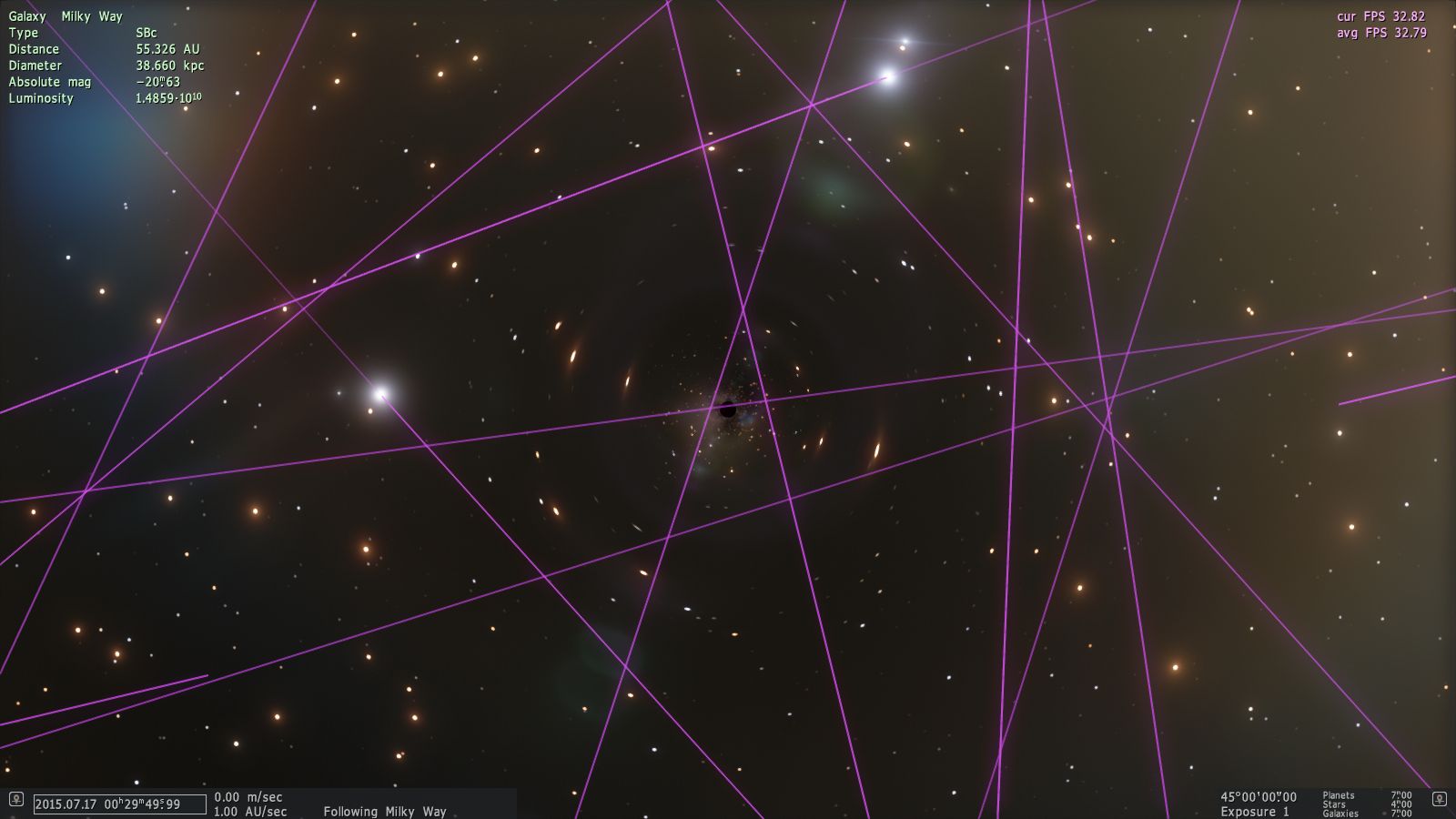
 Pirate
 New Zealand
  Hungary