ENG New site

Advanced search
[ New messages · Forum rules · Members ]
Known issues and bug reports - SpaceEngine 0.97
HarbingerDawnDate: Wednesday, 01.05.2013, 06:26 | Message # 1
Cosmic Curator
Group: Administrators
United States
Messages: 8717
Status: Offline
Please post here all of your reports about bugs or crashes in SpaceEngine. Before you post any bugs, please follow these steps:

  • Read the Troubleshooting for SpaceEngine 0.97. It is possible that your problem can be solved there.

  • Make sure that your bugs are not on the following list of known issues. You can use your browser's word finder to help search the list.

  • If the bug is not on the list then please post it in this thread. Attach to your message a screenshot (if possible) and a log file (it's called the "se.log" and is located in the system folder of SpaceEngine's directory). Only the log file will help me to understand your problem and find a solution.


    Known Issues


    Edited by HarbingerDawn - Monday, 30.09.2013, 22:45
  •  
    SpaceEngineerDate: Wednesday, 29.05.2013, 09:13 | Message # 136
    Author of Space Engine
    Group: Administrators
    Russian Federation
    Messages: 4800
    Status: Offline
    Quote (smjjames)
    I spotted this while looking around a challenge galaxy. If the secondary planet of a barycenter has life, the primary planet doesn't show the moon as having life on it. This one might be an old bug or may just be an oddity of the way barycenters work.

    This is a bug, it has been fixed.

    Quote (neutronium76)
    When the solar system is in the field of view, the comet is visible: but it is not rendered when the solar system is out of the field of view:

    Of course. Any planetary system in SE have a certain bounding radius, for clipping. If sphere with this radius is outside the screen, system does not render. If system is so far away that sphere is smaller than one pixel, it does not generate and render.
    But this comet have a hyperbolic orbit, so it may pass the bounding sphere surface and go into interstellar space. SE can't handle such objects directly. And this have no purpose - at large time scales the comet must be affected by a gravity of neighboring stars and become a part of their systems. SE can't model this.


    smjjamesDate: Wednesday, 29.05.2013, 15:31 | Message # 137
    World Builder
    Group: Users
    United States
    Messages: 913
    Status: Offline
    Quote (SpaceEngineer)
    Quote (smjjames)
    I spotted this while looking around a challenge galaxy. If the secondary planet of a barycenter has life, the primary planet doesn't show the moon as having life on it. This one might be an old bug or may just be an oddity of the way barycenters work.

    This is a bug, it has been fixed.


    'k, cool to confirm that it's been dealt with.


    smjjamesDate: Wednesday, 29.05.2013, 23:21 | Message # 138
    World Builder
    Group: Users
    United States
    Messages: 913
    Status: Offline
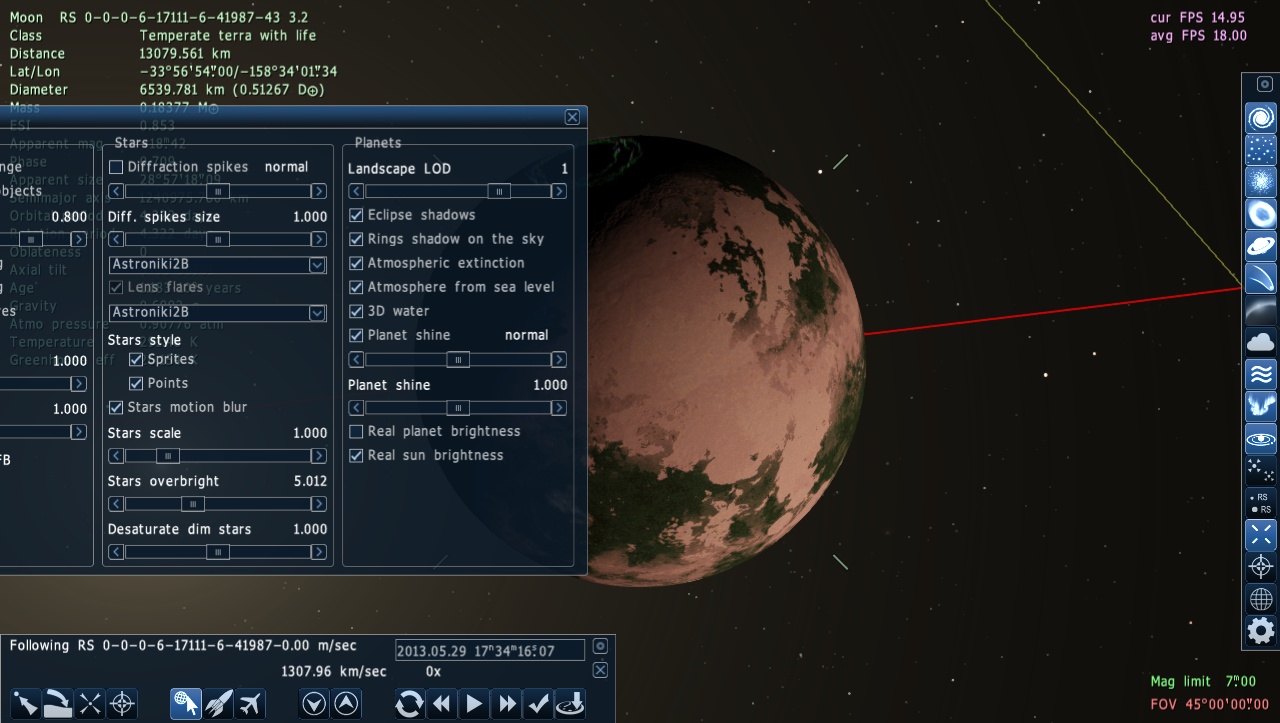
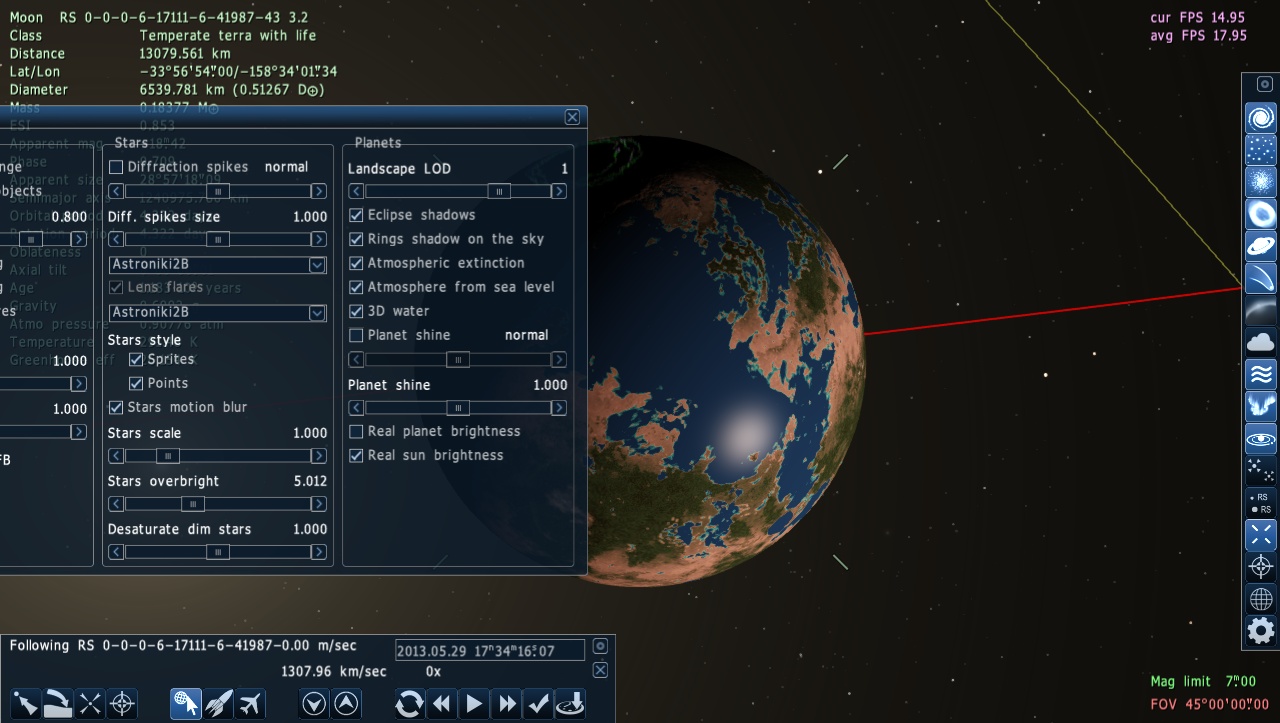
    Sometimes I like to turn the atmosphere off to see the landforms better (especially if it's a hazy atmosphere) and I noticed that the water was dissapearing as well. In checking it out a bit deeper, it seems to have something to do with planet shine.


    Attachments: 6998198.jpg (219.5 Kb) · 5285000.jpg (226.4 Kb)


    VoekoevakaDate: Wednesday, 29.05.2013, 23:43 | Message # 139
    World Builder
    Group: SE team
    France
    Messages: 1016
    Status: Offline
    I think is is a problem with 3D water. I often see the seas dissapearing when I took 3D water on.


    Want some music of mine ? Please go here !

     
    SpaceEngineerDate: Thursday, 30.05.2013, 06:58 | Message # 140
    Author of Space Engine
    Group: Administrators
    Russian Federation
    Messages: 4800
    Status: Offline
    Quote (smjjames)
    Sometimes I like to turn the atmosphere off to see the landforms better (especially if it's a hazy atmosphere) and I noticed that the water was dissapearing as well. In checking it out a bit deeper, it seems to have something to do with planet shine.

    It is a bug in the shader manager. SE uses wrong shader sometimes.


    LucasDate: Thursday, 30.05.2013, 20:18 | Message # 141
    Astronaut
    Group: Users
    Sweden
    Messages: 46
    Status: Offline
    This one is probably old (got it in 0.9.6 as well), but I wonder why stars have started to disappear in the background when I look at suns and planets real close.
     
    anonymousgamerDate: Thursday, 30.05.2013, 20:32 | Message # 142
    World Builder
    Group: Global Moderators
    United States
    Messages: 1011
    Status: Offline
    Intended feature. When looking at a sun/planet in real life, the light would cause the camera to lower the exposure so the planet/star doesn't look washed out, thus as a consequence making stars too dim to see. It's similar to walking inside a building after being outside on a sunny day. Notice how dim everything looks for a couple minutes?

    Also why the Moon Landing photos have no stars in the background.


    Desktop: FX-8350 4.0 GHz, 8 GB DDR3 RAM, EVGA GeForce GTX 1080 FTW 8 GB, 2 TB HDD, 24 inch 1920x1080 screen
    Laptop: Core i5 480M 2.66 GHz (turbo 2.93), 8 GB DDR3 RAM, AMD Radeon HD 6550m 1 GB, 640 GB HDD, 17.3 inch 1600x900 screen
     
    LucasDate: Thursday, 30.05.2013, 20:41 | Message # 143
    Astronaut
    Group: Users
    Sweden
    Messages: 46
    Status: Offline
    Quote (anonymousgamer)
    Intended feature. When looking at a sun/planet in real life, the light would cause the camera to lower the exposure so the planet/star doesn't look washed out, thus as a consequence making stars too dim to see. It's similar to walking inside a building after being outside on a sunny day. Notice how dim everything looks for a couple minutes?

    Also why the Moon Landing photos have no stars in the background.


    Before when I watched a sun, I could see planets behind...

    Oh, I see... it was the auto exposure button...


    Edited by Lucas - Thursday, 30.05.2013, 20:42
     
    smjjamesDate: Saturday, 01.06.2013, 21:56 | Message # 144
    World Builder
    Group: Users
    United States
    Messages: 913
    Status: Offline
    Okay..... I just had something really wierd happen.

    I was at this location posted below checking out a crater when I noticed that the crater rim and mountains were being transparent in that the primaries shone right through them at sunset/rise as if the crater rim and mountains didn't exist, saved that spot as the location so I could come back to it, looked around for a normal mountain range on that planet. Found one, landed, and checked and it was working fine.

    Then I exited SE for whatever reason (to clear memory maybe) and when i came back, there was absolutely nothing there, the object simply vanished.
    Place "Moon Temperate terra with life"
    {
    Body "RSC 0-7-1385623-456-6488-0-0-276 1.3"
    Parent "RSC 0-7-1385623-456-6488-0-0-276 1"
    Pos (3.133593113723715e-011, -3.303210352814667e-012, 1.267805738321658e-010)
    Rot (-0.6195099236181922, -0.6932463937410089, -0.308189762973976, -0.2015836355007826)
    Date "2013.12.12 02:42:01.39"
    Vel 3.2407764e-015
    Mode 2
    }

    This is what i found to actually be at the system coordinates, a completely different system.


    The last time I remember having this glitch is when I found a frozen terra with life, then when I tried to come back to it, it was replaced with something else. Wierd glitch whatever this is O.o

    Also, should have saved the SE log, sorry, then again, I didn't even know it was going to happen.

    Added (02.06.2013, 00:56)
    ---------------------------------------------
    In a separate bug report, looks like the bug mentioned back here: http://en.spaceengine.org/forum/26-705-13792-16-1351289359 hasn't been 100% squashed. The bug here though might be that the cluster is so tiny, 0.419 parsecs in diameter.

    I couldn't replicate the effect for the system as a whole, but it's visible when moving around while looking at one of the planets or moons.

    Place "returned glitch"
    {
    Body "RSC 0-7-1385623-456-6165-0-0-5 1.1"
    Parent "RSC 0-7-1385623-456-6165-0-0-5 1"
    Pos (5.353341229509534e-011, 3.812963367353511e-011, 9.609643696019063e-011)
    Rot (0.6519705928397682, -0.2928792877855305, 0.03894159733695155, -0.6983119796017024)
    Date "2013.06.01 20:50:00.06"
    Vel 1.1068067e-011
    Mode 1
    }

    Attachments: 8734102.jpg (258.5 Kb)


    Edited by smjjames - Saturday, 01.06.2013, 20:41
     
    HarbingerDawnDate: Saturday, 01.06.2013, 23:15 | Message # 145
    Cosmic Curator
    Group: Administrators
    United States
    Messages: 8717
    Status: Offline
    Are you using asynchronous loading?


    All forum users, please read this!
    My SE mods and addons
    Phenom II X6 1090T 3.2 GHz, 16 GB DDR3 RAM, GTX 970 3584 MB VRAM
     
    smjjamesDate: Saturday, 01.06.2013, 23:43 | Message # 146
    World Builder
    Group: Users
    United States
    Messages: 913
    Status: Offline
    Quote (HarbingerDawn)
    Are you using asynchronous loading?


    Nope, I changed it to interleaved after I had those initial problems related to asynchronous loading when I installed 0.97.

    Added (02.06.2013, 02:43)
    ---------------------------------------------
    DAMMIT, It happened again. I was on a planet moving around a bit and trying to get a shot right and the scenery was still busy loading when SE crashed. When I returned, the system had vanished (object not found).

    Also, there were a few times while I was hunting around for the challenge that SE froze up and became unresponsive and the only way I could shut it down was to end proccess, could I have messed something up? I didn't seem to have that problem with the challenge galaxy though.

    Edit: Both of those times, the locations were inside an open cluster, no idea if that is coincidence though with only two of these that happened.


    Edited by smjjames - Saturday, 01.06.2013, 23:57
     
    SpaceEngineerDate: Sunday, 02.06.2013, 12:41 | Message # 147
    Author of Space Engine
    Group: Administrators
    Russian Federation
    Messages: 4800
    Status: Offline
    Quote (smjjames)
    Also, there were a few times while I was hunting around for the challenge that SE froze up and became unresponsive and the only way I could shut it down was to end proccess, could I have messed something up? I didn't seem to have that problem with the challenge galaxy though.

    Did you use Star browser before? I fixed the cause of great slow-down then using SB in the dense parts of the galaxy (ie star clusters).


    Fireinthehole-Date: Sunday, 02.06.2013, 12:53 | Message # 148
    Pioneer
    Group: Translators
    Sweden
    Messages: 365
    Status: Offline
    Quote (anonymousgamer)
    Intended feature. When looking at a sun/planet in real life, the light would cause the camera to lower the exposure so the planet/star doesn't look washed out, thus as a consequence making stars too dim to see. It's similar to walking inside a building after being outside on a sunny day. Notice how dim everything looks for a couple minutes?

    Also why the Moon Landing photos have no stars in the background.

    You can also test looking up at the night sky, and hold a flash light and let the light hit your eyes. Not many stars can be seen. smile


    Love Space Engine!
     
    smjjamesDate: Sunday, 02.06.2013, 16:56 | Message # 149
    World Builder
    Group: Users
    United States
    Messages: 913
    Status: Offline
    Quote (SpaceEngineer)
    Quote (smjjames)
    Also, there were a few times while I was hunting around for the challenge that SE froze up and became unresponsive and the only way I could shut it down was to end proccess, could I have messed something up? I didn't seem to have that problem with the challenge galaxy though.

    Did you use Star browser before? I fixed the cause of great slow-down then using SB in the dense parts of the galaxy (ie star clusters).


    Yeah, that was while I had been using the star browser in that challenge galaxy. However, the galaxy in this case was a large elliptical (100kp I think) and I was still pretty much on the outskirts. I was using a search of 100 parsecs and in the later stages of my search, the SB varied between 300-500 or something like that.

    Although for the two cases where the system unexpecedly dissapeared, I did use the star browser before the first one but not the second.


    Edited by smjjames - Sunday, 02.06.2013, 18:48
     
    smjjamesDate: Monday, 03.06.2013, 20:06 | Message # 150
    World Builder
    Group: Users
    United States
    Messages: 913
    Status: Offline
    Since this isn't an 'asking for help' post, I guess I could post this crash report here.

    While going around open clusters pretty close to the core of this galaxy (between 5k and 2800 parsecs), I had noticed that sometimes while in clusters, I would get a massive FPS drop from my normal FPS of around 30-40 (sometimes 20s) to averaging 1-3 FPS. It seemed sort of random, almost every other cluster or two. I didn't check the distance of every cluster from the core, so I don't know if that is a factor.

    When I had gone to what might have been the closest (2,800 parsec from core), I was having the heavy lagspike as usual and was trying to ride it out as it just sort of spontaneously goes away, so I was looking around trying to find a good triple star system when SE crashed from the lag.

    However, when I started SE back up, the FPS was fine.

    Oh yeah, I'm seeing the object not found in the journey log from some systems I visited. So, there's something going on with clusters. There's also something interesting, the journey log coordinate boxes (that you select) for the selected star system with planets that dissapeared and the system above it both say that they are triple systems, yet the infobox says a different star luminosity and they're binary.

    One thing I'm noticing is that while systems outside star clusters are fine, stars inside clusters are screwed up (at least most of the ones I visit anyway).

    I did some testing by clearing out the cache to see what would happen, the star I have in the example changed, then I went to a distant cluster, restarted and the star system had changed again. I went to that particular star (now a white giant), restarted and it didn't change. Then I went some way distance away (was double checking on stars outside clusters) and somehow it seems to have locked into that and didn't change even though I restarted. The other triple system in the log in the screenshot also seems to have settled as a single A2 V star.

    Since it's already messed up for me, could someone check that star coordinate and see what is there, for SCIENCE!

    To summarize, there is something screwy going on with star clusters, and I have the loader mode on interleaved.


    Edit: Just adding an observation note that Globular clusters are unaffected.

    Attachments: 6217924.log (384.5 Kb) · 7830813.jpg (261.5 Kb)


    Edited by smjjames - Wednesday, 05.06.2013, 19:48
     
    Search: