|
SpaceEngine FAQ
|
|
| Galacticrafter | Date: Monday, 18.05.2015, 14:04 | Message # 376 |
|
Observer
Group: Newbies
 United States
Messages: 2
Status: Offline
| Ever think of adding multiplayer SE, where you can be players or ships? 
|
| |
| |
| DoctorOfSpace | Date: Monday, 18.05.2015, 14:39 | Message # 377 |
 Galaxy Architect
Group: Global Moderators
 Pirate
Messages: 3600
Status: Offline
| Galacticrafter, this is planned for the eventual online game. The main goal right now is to finish the engine so it may be quite some time before that happens.
Intel Core i7-5820K 4.2GHz 6-Core Processor
G.Skill Ripjaws V Series 32GB (4 x 8GB) DDR4-2400 Memory
EVGA GTX 980 Ti SC 6GB
|
| |
| |
| Forerunner | Date: Sunday, 24.05.2015, 10:09 | Message # 378 |
|
Observer
Group: Newbies
 Hong Kong
Messages: 3
Status: Offline
| Is it possible to makes the galaxy rotate? It's weird that the galaxy don't move a bit. 
|
| |
| |
| Fireinthehole | Date: Sunday, 24.05.2015, 10:12 | Message # 379 |
 Pioneer
Group: Translators
 Sweden
Messages: 356
Status: Offline
| Quote Forerunner (  ) Is it possible to makes the galaxy rotate? It's weird that the galaxy don't move a bit.
http://en.spaceengine.org/forum/21-11-1
It's uncertain if it is possible.
Love SpaceEngine!
|
| |
| |
| sent808 | Date: Saturday, 06.06.2015, 23:03 | Message # 380 |
|
Astronaut
Group: Users
Pirate
Messages: 55
Status: Offline
| Hi guys. Does anyone know the max number of star digit in a cluster.
I mean i have I generated a galaxy and i have for example this: Body "RS 10952-142058-0-0-X" (this is a star)
I know the values: 10952 - nomber of the Galaxy.
142058 - galactic sector number
0 - octree level number
0 - octree block number
X (this is the specific number for the star)
Now for my question: what is the max number X can be? Or the same question: What is the maximun number of stars one octree block can have? Also the same question for Star Clusters. Please i really need thanks Added (06.06.2015, 23:03)
---------------------------------------------
bumb? Nobody knows this question?
|
| |
| |
| PlutonianEmpire | Date: Friday, 12.06.2015, 22:58 | Message # 381 |
 Pioneer
Group: Users
United States
Messages: 475
Status: Offline
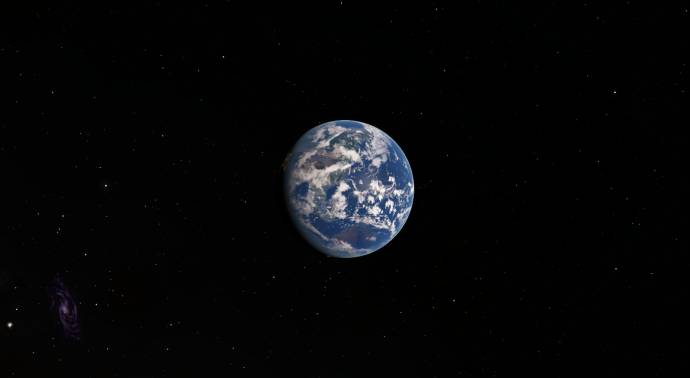
| I"m curious about the cloud renderings in SE. I've noticed that although the Earth uses a pre-existing cloud texture, it is the only world in the entire default SE universe whose cloud patterns give it a "trailing" look, where the equatorial clouds look like they lag behind the mid-latitude clouds, as the planet rotates:
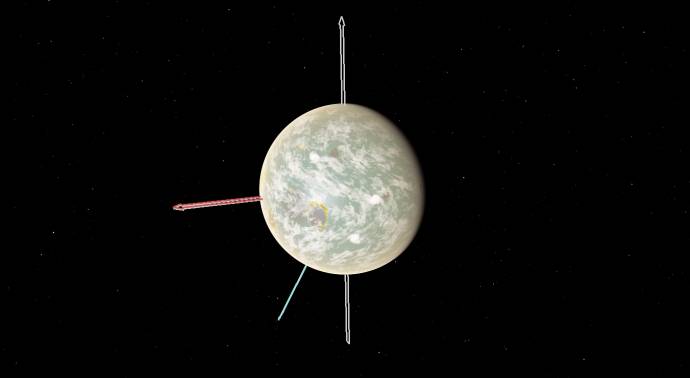
But, on every single procedural life-terra, that has its own rotation independent from it's star I have visited in my entire time with SE, the generated clouds have a "leading" look, where they look like they "lead" ahead of the mid-latitude clouds as the planet rotates:
Is there a reason why it's this way?
(EDIT: Changed pics, and some rewording.)
Specs: Dell Inspiron 5547 (Laptop); 8 gigabytes of RAM; Processor: Intel® Core™ i5-4210U CPU @ 1.70GHz (4 CPUs), ~2.4GHz; Operating System: Windows 7 Home Premium 64-bit; Graphics: Intel® HD Graphics 4400 (That's all there is :( )
Edited by PlutonianEmpire - Friday, 12.06.2015, 23:05 |
| |
| |
| RockoRocks | Date: Tuesday, 30.06.2015, 06:44 | Message # 382 |
 World Builder
Group: Users
 Belgium
Messages: 674
Status: Offline
| I've opened the universe.cfg file and noticed this was in it:
Code //"catalogs/planets/SolarSys30000.sc" // Bonus2:) Comment out SolarSys.sc and uncomment this
I can't find the SolarSys30000.sc (not SolarSys3000.sc) file anywhere. Is this a typo/mistake or something that hasn't been released yet? Where can I find this file?
I will be inactive on this forum for the time being. Might come back eventually
AMD AR-3305M APU w/ Radeon HD 1.90 GHz 6,00 GB RAM
|
| |
| |
| PlutonianEmpire | Date: Tuesday, 07.07.2015, 23:11 | Message # 383 |
|
Pioneer
Group: Users
United States
Messages: 475
Status: Offline
| Since atmosphere models take up 8 gigs of vram permanently, does the game or the computer remember those 8 gigabytes for the same atmosphere model when a new version of SE is installed?
Specs: Dell Inspiron 5547 (Laptop); 8 gigabytes of RAM; Processor: Intel® Core™ i5-4210U CPU @ 1.70GHz (4 CPUs), ~2.4GHz; Operating System: Windows 7 Home Premium 64-bit; Graphics: Intel® HD Graphics 4400 (That's all there is :( )
|
| |
| |
| HarbingerDawn | Date: Wednesday, 08.07.2015, 02:54 | Message # 384 |
 Cosmic Curator
Group: Administrators
United States
Messages: 8717
Status: Offline
| Quote PlutonianEmpire ( ) Since atmosphere models take up 8 gigs of vram permanently
8 gigs? lolwut?
All forum users, please read this!
My SE mods and addons
Phenom II X6 1090T 3.2 GHz, 16 GB DDR3 RAM, GTX 970 3584 MB VRAM
|
| |
| |
| PlutonianEmpire | Date: Wednesday, 08.07.2015, 03:31 | Message # 385 |
|
Pioneer
Group: Users
United States
Messages: 475
Status: Offline
| Egads, I meant megabytes! My brain isn't working lately, it seems. But yeah, I was referring the approximately 8 megabytes used for .atm models in the vram. My bad.
Specs: Dell Inspiron 5547 (Laptop); 8 gigabytes of RAM; Processor: Intel® Core™ i5-4210U CPU @ 1.70GHz (4 CPUs), ~2.4GHz; Operating System: Windows 7 Home Premium 64-bit; Graphics: Intel® HD Graphics 4400 (That's all there is :( )
|
| |
| |
| Bells_Theorem | Date: Thursday, 09.07.2015, 02:26 | Message # 386 |
 Explorer
Group: Users
United States
Messages: 188
Status: Offline
| Forgive me if this has been asked already.
Where are your saved locations stored? I had a video project planned on a specific planet but had to recover from a BSOD. When I got back up and running half of the files including the .exe were missing from both my main and back up folders. I'm hoping the file where my planet was stored is still there.
Thanks in advance.
|
| |
| |
| HarbingerDawn | Date: Thursday, 09.07.2015, 05:03 | Message # 387 |
|
Cosmic Curator
Group: Administrators
United States
Messages: 8717
Status: Offline
| In the config folder. If you saved it, it's in places. If you just visited, it's in journal.
Also, please read the forum rules before posting in the future, a new thread was not necessary for this topic.
All forum users, please read this!
My SE mods and addons
Phenom II X6 1090T 3.2 GHz, 16 GB DDR3 RAM, GTX 970 3584 MB VRAM
|
| |
| |
| courtney788 | Date: Saturday, 18.07.2015, 20:03 | Message # 388 |
 Observer
Group: Banned
Pirate
Messages: 7
Status: Offline
| i have questions
Where i find black holes?
Why there planets around Vega star in Wiki there no planets around Vega?
|
| |
| |
| Aerospacefag | Date: Saturday, 18.07.2015, 20:31 | Message # 389 |
 Pioneer
Group: Users
 Russian Federation
Messages: 401
Status: Offline
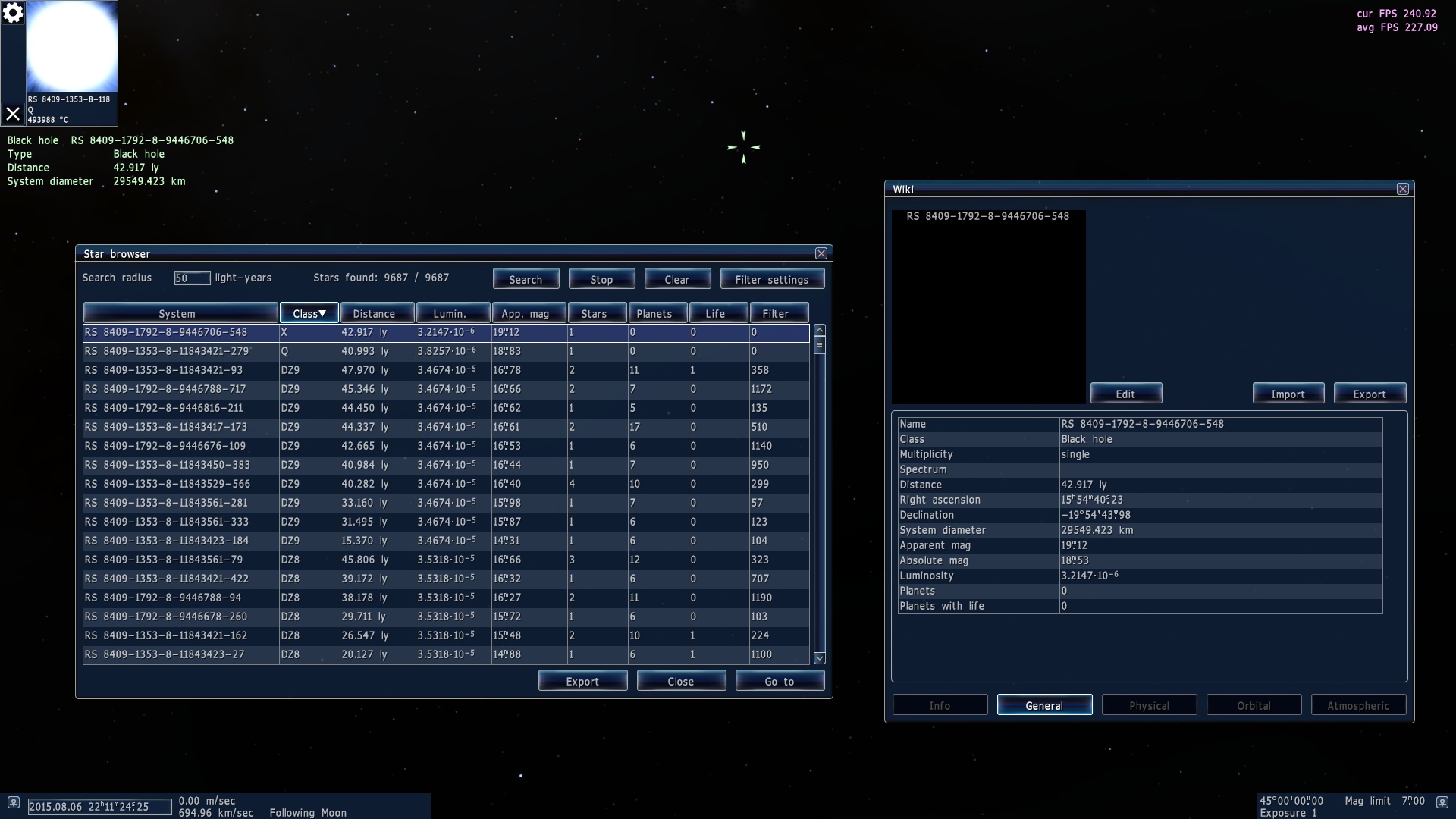
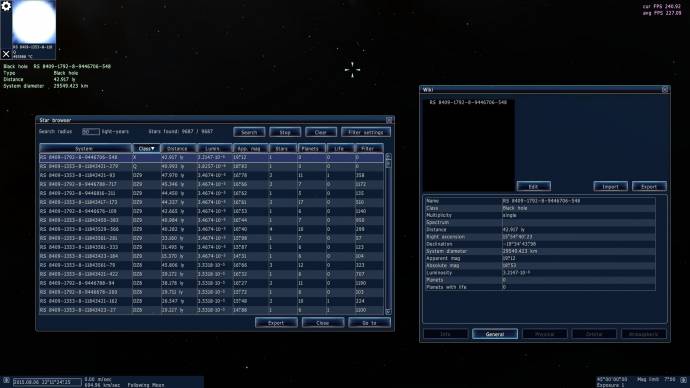
| courtney788, Shift+F3 opens star browser, where you can find some of them.
There is at least one back hole and a pulsar as close as 40 ly from Earth.
|
| |
| |
| courtney788 | Date: Saturday, 18.07.2015, 20:36 | Message # 390 |
|
Observer
Group: Banned
Pirate
Messages: 7
Status: Offline
| Oh Thanks you for helping! I found a black hole with 5 planets
|
| |
| |
 ENG
ENG New site


 United States


 Pirate
  Hong Kong
 Sweden

 Belgium


 Russian Federation