|
Work progress and public beta test - 0.9.7.4
|
|
| Koby | Date: Wednesday, 13.01.2016, 15:42 | Message # 1216 |
|
Observer
Group: Newbies
 United States
Messages: 2
Status: Offline
| I found a temperate terra in a triple brown dwarf system that seems to be way too warm for where it is. It has several large moons which is also odd.
|
| |
| |
| huishb | Date: Wednesday, 13.01.2016, 16:23 | Message # 1217 |
 Astronaut
Group: Users
 Pirate
Messages: 72
Status: Offline
| Guy's, where is the accretion disk setting?
Possessor: AMD FX™-4100 Quad-Core Possessor (CPUs), ~3.6 GHz
Memory: 8192MB RAM. Graphics Card: NVIDIA GeForce GT 610. Approx total memory: 4045 MB
|
| |
| |
| parameciumkid | Date: Wednesday, 13.01.2016, 18:02 | Message # 1218 |
 Explorer
Group: Users
United States
Messages: 277
Status: Offline
| Quote SpaceEngineer (  )
Try also parameter TwistMagn in the editor.
If this does what DoctorOfSpace has illustrated, then all I really wanted for that "motion blur" thing was to have this parameter get multiplied by the disk rotation speed (or if it already is, tweak the effect of the rotation speed) so that fast-rotating disks appear more like smooth circular rings.
If I'm still not making sense, imagine an unlabeled CD spinning. Since it has near-perfect radial symmetry, it's all but visually indistinguishable from a stationary CD. This means that if you made a stop-motion film of a CD, rotating it a bit each frame, it would look the same as a real film of a CD, whereas if you tried that with something asymmetrical like a fan, it would appear to be jittering around rather than rotating due to the lack of motion blur.
Currently, rapidly rotating disks are exhibiting this jittering effect, but if TwistMagn were increased enough with speed, they would be more like perfectly circular CDs and the effect would go away.
Intel HD Graphics 4000 ;P
|
| |
| |
| JackDole | Date: Wednesday, 13.01.2016, 18:13 | Message # 1219 |
 Star Engineer
Group: Local Moderators
 Germany
Messages: 1742
Status: Offline
| Quote huishb ( ) Guy's, where is the accretion disk setting?
You can change the accretion disk in the 'Object Editor. Select the black hole and open the editor with Shift-F2.

Don't forget to look here.

|
| |
| |
| SpaceEngineer | Date: Wednesday, 13.01.2016, 19:39 | Message # 1220 |
 Author of Space Engine
Group: Administrators
 Russian Federation
Messages: 4800
Status: Offline
| Quote DoctorOfSpace ( ) I only did this inside the shader to reduce all black holes a bit
Lol why did you do this? Size of black hole is calculated based on it's mass. Changing that making gravity lensing effect working incorrectly.
Quote HarbingerDawn ( )
Would it help to only update one face of the env map at a time instead of all 6 faces?
Yes, but it would make seams while flying in warp. This is not serious for (amost) stationary black holes, but serious issue for ships.
Quote parameciumkid ( ) Currently, rapidly rotating disks are exhibiting this jittering effect, but if TwistMagn were increased enough with speed, they would be more like perfectly circular CDs and the effect would go away.
TwistMagn is not a blur. It's amount of twist, which is reflected in its name.

|
| |
| |
| DoctorOfSpace | Date: Wednesday, 13.01.2016, 20:16 | Message # 1221 |
 Galaxy Architect
Group: Global Moderators
Pirate
Messages: 3600
Status: Offline
| Quote SpaceEngineer ( ) why did you do this?
Just wanted to see if it was possible.
Quote SpaceEngineer ( ) Changing that making gravity lensing effect working incorrectly.
I haven't noticed that
Intel Core i7-5820K 4.2GHz 6-Core Processor
G.Skill Ripjaws V Series 32GB (4 x 8GB) DDR4-2400 Memory
EVGA GTX 980 Ti SC 6GB
|
| |
| |
| n0b0dy | Date: Wednesday, 13.01.2016, 20:49 | Message # 1222 |
 Explorer
Group: Users
Pirate
Messages: 297
Status: Offline
| Just a persisting CTD while trying to hyperspace from bernard star to any other star while controlling a spacecraft I made with the spacecraft editor.
Program CTDs while about 1/3rd from target system. I noticed a sudden drop in fps as the shipwarp effect becomes active. I am including se.log for reference.
|
| |
| |
| DoctorOfSpace | Date: Wednesday, 13.01.2016, 21:03 | Message # 1223 |
|
Galaxy Architect
Group: Global Moderators
Pirate
Messages: 3600
Status: Offline
| Quote n0b0dy ( ) Program CTDs while about 1/3rd from target system. I noticed a sudden drop in fps as the shipwarp effect becomes active. I am including se.log for reference.
Try turning off high quality black holes when flying ships. Even I get crashes occasionally when flying ships with high quality black holes enabled.
Intel Core i7-5820K 4.2GHz 6-Core Processor
G.Skill Ripjaws V Series 32GB (4 x 8GB) DDR4-2400 Memory
EVGA GTX 980 Ti SC 6GB
|
| |
| |
| Retsof | Date: Thursday, 14.01.2016, 06:34 | Message # 1224 |
|
Astronaut
Group: Users
United States
Messages: 56
Status: Offline
| Small suggestion. Can the ship controls (prograde/retrograde, normal +/-, etc) be in relation to the reference body instead of the target body?
|
| |
| |
| n0b0dy | Date: Thursday, 14.01.2016, 07:29 | Message # 1225 |
|
Explorer
Group: Users
Pirate
Messages: 297
Status: Offline
| Quote Retsof ( ) Small suggestion. Can the ship controls (prograde/retrograde, normal +/-, etc) be in relation to the reference body instead of the target body?
This. And also to be able to set reference body and/or target body to none.
|
| |
| |
| n0b0dy | Date: Thursday, 14.01.2016, 12:51 | Message # 1226 |
|
Explorer
Group: Users
Pirate
Messages: 297
Status: Offline
| Quote DoctorOfSpace ( ) Try turning off high quality black holes when flying ships
Tried. Still CTD when controlling ship.
PS: Also tried increasing the goto time from user.cfg (doubled it) in order to give the engine more time to render things. Still CTD.
I am now going to try disabling various other options from graphics (ctrl+F4) menu. And also try different resolutiion - 5760x1080 maybe a bit too much..
Ok I am including a log from a vanilla (no addons) 0.974 patch 8 (latest). Still CTD at 1920x1080 window and fullscreen when jumping from system to system with a ship using the hyperjump command while controlling the ship. Nvidia driver 361.43 win 7x64sp1 up-todate.
Order to achieve vanilla was: 0972 vanilla --> copy paste 0973 vanilla on top --> copy paste 0974 patch 8.
Edited by n0b0dy - Thursday, 14.01.2016, 14:07 |
| |
| |
| DoctorOfSpace | Date: Thursday, 14.01.2016, 14:02 | Message # 1227 |
|
Galaxy Architect
Group: Global Moderators
Pirate
Messages: 3600
Status: Offline
| Quote n0b0dy ( ) 5760x1080 maybe a bit too much
That is most probably the cause of the crashing. Such a high resolution combined with the demanding warp effect will eat through your memory.
Intel Core i7-5820K 4.2GHz 6-Core Processor
G.Skill Ripjaws V Series 32GB (4 x 8GB) DDR4-2400 Memory
EVGA GTX 980 Ti SC 6GB
|
| |
| |
| n0b0dy | Date: Thursday, 14.01.2016, 14:05 | Message # 1228 |
|
Explorer
Group: Users
Pirate
Messages: 297
Status: Offline
| Quote DoctorOfSpace ( ) That is most probably the cause of the crashing
Unfortunately it is not. See post above :(
Just to update on this bug: If I increase the goto time in the user.cfg by a factor of one hundred and at the same time I only choose a distance between systems of about ~ 10lys, it doesn't crash. But by a factor of 10 it still crashes. When warp speed goes roughly above 1 ly/sec it crashes so I presume that even by increasing go to time it will still crash if warp speed exceeds ~ 1ly/sec.
Edited by n0b0dy - Thursday, 14.01.2016, 15:19 |
| |
| |
| Thomas988 | Date: Thursday, 14.01.2016, 15:19 | Message # 1229 |
 Space Pilot
Group: Users
United States
Messages: 125
Status: Offline
| Quote Retsof ( ) Small suggestion. Can the ship controls (prograde/retrograde, normal +/-, etc) be in relation to the reference body instead of the target body?
Quote n0b0dy ( ) This. And also to be able to set reference body and/or target body to none.
I second these! 
All you need in life are space games and typhlosions.
|
| |
| |
| DoctorOfSpace | Date: Thursday, 14.01.2016, 15:33 | Message # 1230 |
|
Galaxy Architect
Group: Global Moderators
Pirate
Messages: 3600
Status: Offline
| Quote n0b0dy ( ) See post above
The only thing I have been able to cause crashes with continually is warping to neutron stars regardless of resolution or settings. 
Intel Core i7-5820K 4.2GHz 6-Core Processor
G.Skill Ripjaws V Series 32GB (4 x 8GB) DDR4-2400 Memory
EVGA GTX 980 Ti SC 6GB
|
| |
| |
 ENG
ENG New site


 United States


 Pirate
 Germany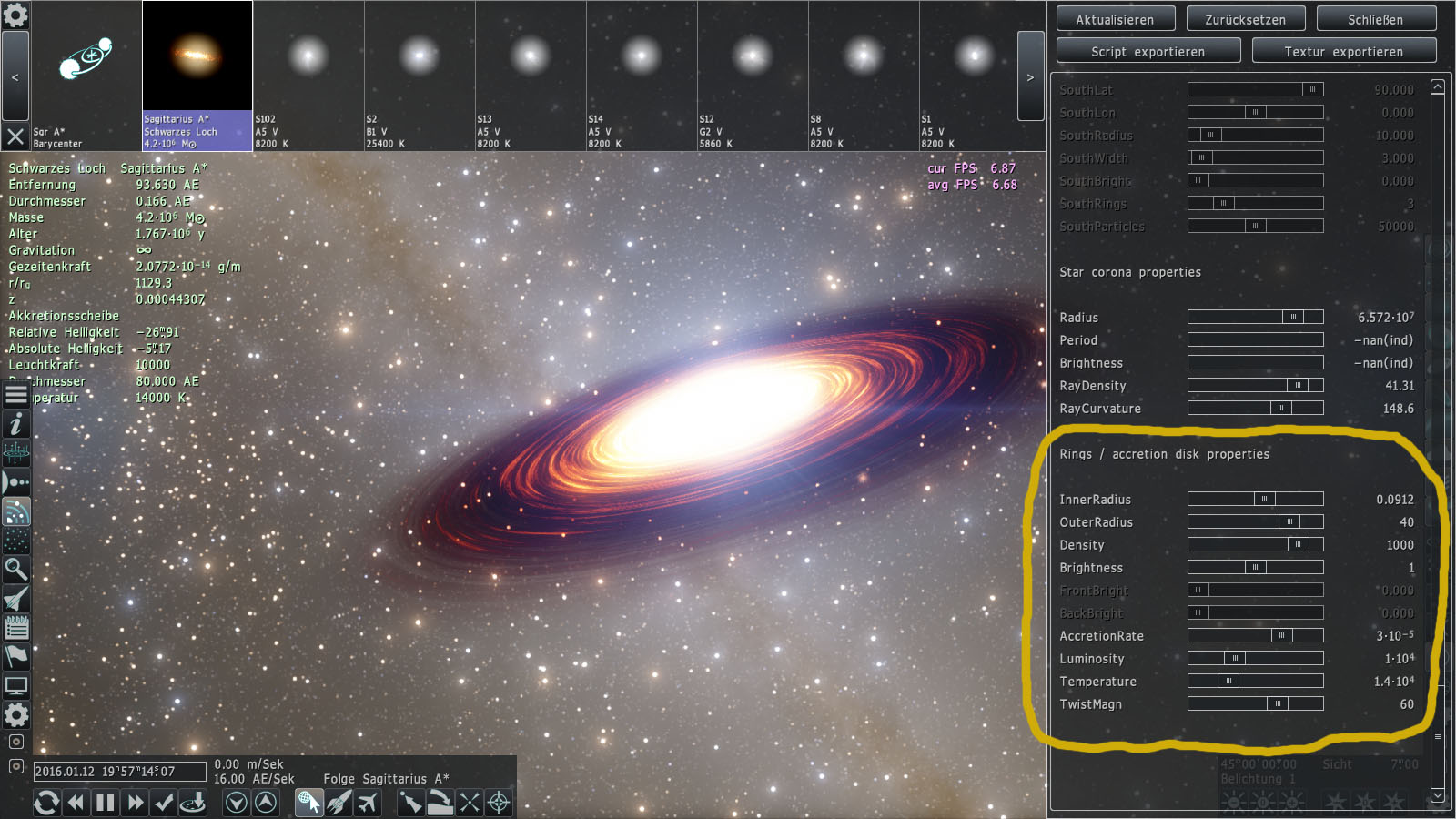

 Russian Federation