Please post here all of your reports about bugs or crashes in SpaceEngine. Before you post any bugs, please follow these steps:
Read the Fixing common issues section below. It is possible that your problem can be solved there.
Read the List of known issues section below and make sure that your bugs are not on in it. You can use your browser's word finder to help search the list.
If the bug is not on the list then please post it in this thread. Attach to your message a screenshot (if possible) and a log file (it's called the se.log and is located in the SpaceEngine/system/ directory). Only the log file will help me to understand your problem and find a solution!
Fixing common issues
1) Obsolete or incompatible drivers These are the most frequent errors found in SE. You will get a popup window with one of these following messages:
- "You have old OpenGL version (2.1.1). Update your graphics card driver or install compatible hardware"
- "You have old GLSL version (1.2). Update your graphics card driver or install compatible hardware"
- "Error loading surface generator shaders. Press YES to run program with procedural planets disabled. Press NO to exit"
Download and install latest drivers for your video card. If you still get this message, it could be that you have an incompatible video card (see next paragraph).
[CRITICAL NOTE] Some recent NVidia drivers are incompatible with SE. Symptoms are flashing planet images on the screen when you open the F2 menu (see the spoiler), missing lens flares, grayed out options for HDR and FXAA in the Graphics settings menu, and other glitches. The errors in the se.log are look like this:
Code
Loading shader "system/shaders/hdr_down4.glsl" 0(4) : error C7621: #extension directive must occur before any non-preprocessor token 0(4) : error C7621: #extension directive must occur before any non-preprocessor token ERROR: Vertex info ----------- 0(4) : error C7621: #extension directive must occur before any non-preprocessor token
Fragment info ------------- 0(4) : error C7621: #extension directive must occur before any non-preprocessor token
If you have run into these problems, update to at least 344.65, or roll back to earlier than 337.xx.
But you still can try and run SpaceEngine by disabling checking of critical errors at startup. Open main.cfg and change value of this parameter to 'true':
IgnoreCriticalCheck true // ignore checking of OpenGL version and critical extensions supporting
NOTE: I can give no guaranties that SpaceEngine will be stable and work correctly if you do make this change.
If you have an "Error loading surface generator shaders" error and press Yes, SpaceEngine can run, but it will not be able to render procedural planetary landscapes.
After updating or rollback of the drivers, you must delete the cache folder in the SpaceEngine directory.
2) Weak system Most of the forum posts I receive are from users that report an inability to start SpaceEngine, This is because those users have inbuilt Intel graphics card, or some old GeForce 5700 series, or not a proper "gaming" laptop. There is no way but to update your hardware system. There are no plans to make a second version of the engine for weaker systems with simplified graphics, CPU texture generation, etc. It would be like coding another engine from scratch. Once again, I would remind everyone that the minimum system requirements can be found on the Home page, but I will mention it here as well:
CPU 2.0 GHz RAM 2 Gb Video GeForce 8600, Radeon HD 2600 vRAM 512 Mb
I stress that the special role played by videocard onboard memory (vRAM). 512 MB is the absolute minimum. The engine uses a large amount of data that must be in video memory (textures, meshes, vbo, etc). If your system meets the recommended requirements, the engine will work, because its development is made for this hardware:
CPU 3.0 GHz RAM 4 Gb Video GeForce 9800 GTX, ATI Mobility HD 5730 vRAM 1024 Mb
You can try to start the engine with some OpenGL extensions disabed, if your hardware does not support them: frame buffer objects (FBO), half floats, float textures and 3D textures. Information about this is written at the beginning of the log (SpaceEngine/system/se.log), after the list of extensions:
If the log reads 'unsupported, then the extension is not supported and the engine will disable itself. If it seems to support float and 3D textures, but the atmosphere of planets has some monstrous bottleneck, such as the GeForce 6200 and GeForce 6600, then it is best to disable those extensions forcibly. This is done in the file config/main.cfg:
Reference: - The Milky Way and other nearby galaxies and nebulae use FBO. HDR rendering mode also use FBO. Disabling it disables the 3D models of galaxies and nebulae, and disables HDR mode. - Atmospheres using float and 3D textures. Disabling any of them disables the atmosphere. HDR rendering mode uses a float textures, disabling them disables HDR. - Shader binary cache reduces lags on loading shaders. Works normally on NVidia, onr ATI and Intel it disabled automatically after first laubch of SpaceEngine.
If you have a Intel HD graphics card, it is better to disable asynchronous loading in the main.cfg as well:
3) System with hybrid graphics (NVidia/ATI + Intel HD) If you're running SE on a laptop with dual graphics, make sure SE runs on NVidia or ATI chip instead of Intel HD. You may see it in the beginning of "SpaceEngine/system/se.log" file. If it says: Vendor: Intel Renderer: Intel® HD Graphics 4000
then you should open NVidia Control Panel or ATI Catalyst and force SpaceEngine.exe run on NVidia/ATI graphics card. If you do not found SpaceEngine profile there, create a new one.
4) Crashing in the interstellar or intergalactic space or after appearing of the nebula in the view field If you open the "SpaceEngine/system/se.log" file after a crash, and it ends up with line like this:
Creating nebula model "cache/models/nebulae/M42.nm",
then try to disable asynchronous loading of a resources. Open the file config/main.cfg with the Notepad and change this parameter to 1:
After that, delete the cache folder from the SpaceEngine directory. Performance will drop while flying between a stars and galaxies, but stability may be improved. After a while, all models of galaxies and nebulae a being be generated, and you may enable asynchronous loading back (set up LoaderMode 2).
5) Spaceship disappear when far from a star It is not a bug. Current version have not yet completed spaceships rendering system - they cannot be rendered if there is no stars or planets in the renderlist. Just imagine that ship becomes invisible in interstellar flight
6) Blurry textures on Solar system planets It is not a bug. Our Solar system planets (Mercury, Venus, Earth, Moon, Mars, Jupiter, Saturn, Uranus, Neptune and its satellites) have no procedural textures, only real ones with limited level-of-detail. You can download addons with high resolution textures to increase level of detail of real planets.
7) Artifacts on procedural planets If you get missing landscape blocks, blurry or blinking textures, random spikes sticking out of surface, check out these recommendations here:
a) If you have a laptop with hybrid graphics, read the paragraph 3.
b) Make sure that you make a "clean" installation of SE. If you install a new version overwriting the old one, you may get many bugs and glitches. If you get some glitches after the patch is installed, remove the folder called cache from SpaceEngine's directory.
c) If this does not help, read the paragraph 8.
8) Frequent crashing while generating planetary surface If you have frequent crashes on planets, or get an "OUT OF MEMORY" message on screen, or "Unexpected deleting of child node" in the log file, try taking these steps first:
Close any other programs that can consume the video memory (games, video players, graphics editors, etc.). SpaceEngine is not a small flash type game, video memory is the most important resource for it. It may help to disable the Windows Aero theme too, as it consumes a lot of video memory.
Disable "3D water" in Graphics settings (Ctrl-F4)
Reduce "Landscape LOD" to -2 in Graphics settings (Ctrl+F4)
Set up the amount of video memory in the main.cfg file:
VideoMemorySize 2048 // video card onboard memory (VRAM) in megabytes
The value must not be less than 1024, but not more than the total amount of physical video memory plus amount of RAM. For example, if you have a graphics card with 1024 MB of video memory, and more than 2 GB of RAM, you can increase VideoMemorySize to 2048.
List of known issues
Green items have been fixed for the next release
Not real bugs, but effects caused by limitations in the engine: - Ships do not render in interstellar space - Star catalog has many errors in star classification, so there are many "giant dwarfs" and "dwarf giants" - Many real binary stars rendered as single, and many single rendered as binary - SE simply have incomplete catalog of binary stars - An unwanted star (sprite) is visible in the barycenter of a binary star from distance greater than 0.01 pc - Comet nucleus star-sprite will shine through planets [example]. - Galaxy/nebula sprites will rotate when seen from certain angles - Auroras, comet tails and rings can be rendered in front of ships/moons sometimes - Lens flares are distorted by gravitational lensing (black holes and ship warp drive effect) - Text editor for Wiki descriptions is not working - it is not implemented yet - Solar system moons don't have extremely accurate orbits (requires implementation of custom orbit models, e.g. VSOP-87) - Sunspot distribution is not always realistic - Ocean tag not yet implemented in planet editor - Rounding errors (e.g. 30° in catalog rounds to 29°59'59.99" displayed on HUD) - Ship retro engines have not been implemented yet
Real bugs: - Too many planets with life (panspermia issue) - Oceanias have landscapes above water - Several bugs with the planet editor - Changing "modes" between simulation and orbital when piloting ships can cause glitches - Few issues with asynchronous loading (stars don't always generate properly, especially when flying to new galaxies) - Holes in some giant stars when camera is directly above a very tall spot[example] - Flashing landscape LOD on a planet when Wiki for it is displayed - Star clusters not displayed in Wiki - GUI response issues with some users (interface items glitchy or not respond easily) - GUI toolbars may completely disappear when pressing pin button while half-hidden - Deep space objects (e.g. stars, galaxies) will shine through planets when HDR for DSO is off, but HDR is on and Bloom is on [example] - Some neutron stars can have very low temperatures[example] - Flickering flare color in close binary systems [example] - Auto-exposure does not react when a sun is blocked while diffraction spikes are set to normal or super - Planet rings have an unrealistic color palette - "Eclipse bug" on distant planets (weird dark shimmering on outer planet caused by inner planet crossing the sun or two suns eclipsing) - Cloud cyclones have cut edges sometimes - Level horizon command (End key) doesn't work properly on oblate objects - Problems when releasing Left + Right click - Lines or junctures are visible on planetary surface - Switching to fullscreen doesn't work sometimes - Weird behavior of movement keys in tracking mode (T) and after releasing it - Automatic reference object setting with spacecraft doesn't always choose the best object (for example, when near dwarf moons or debris asteroids close to a planet you are trying to orbit) - 3D water fog sometimes starts above the water surface - Problems with the skybox export interface, and with the planetarium after using it, for some users - Music player will unpause when SE window is minimized and restored, or when entering and exiting the main menu - If a galaxy model is selected, the camera is not following any object, and the program is in Edit Mode, closing and restarting the program will cause the WASDRF movement keys to behave incorrectly until the camera is set to follow an object - "Crop orbits" in the Map mode doesn't work - Spaceship and lens flare textures do not load when loader mode is set to "Immediate" - Visual atmosphere heights are inconsistently and unrealistically generated - Physical atmosphere properties are inconsistently and unrealistically generated, and are not tied to the visual models - Dwarf moons can be generated on colliding orbits - Moons are never generated with retrograde orbits - Bugs with the surfaces of carbon stars and zirconium stars - Cyclones are not generated in the southern hemispheres of gas giants - Sometimes, worlds which are too small are classed as "selena" when they should be classed as asteroid - Shimmering bloom splotch when very close to the surface of a planet [example] - CW/CCW rotation keys for ship in atmosphere are reversed - Mouse axis inversion settings for spaceship controls are not saved - Z faces are switched when exporting skyboxes (pos_Z is really neg_Z)
Harha, it seems you have not properly installed version, because finnish localization is broken.
The isssue with lens flares in "super" mode is because they are made incorrectly. In "super" mode, first flare texture convolved with sun image (this is simulation of physically corrected phenomena). It must be a single texture that fills entire field. It must not be an texture atlas. Flares named Duality, Eden, EVEolution, Nostalgic, SE 0.95 flares are not compatible with "super" mode because of using texture atlas, all AstroNiki flares - due to use very small flare image in a huge black texture. Only Anamorphic and old SE 0.95 flares are work normally in "super" mode.
Harha, it seems you have not properly installed version, because finnish localization is broken.
I appreciate your response. However, I installed the game again using English language, uninstalled my old Ati drivers and installed new HD4890 Win 7 x64 drivers from the amd site. I started the game and the outcome is still the same as you can see in the screenshot below.
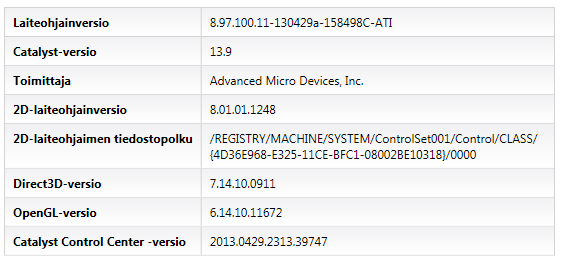
My driver INFO:
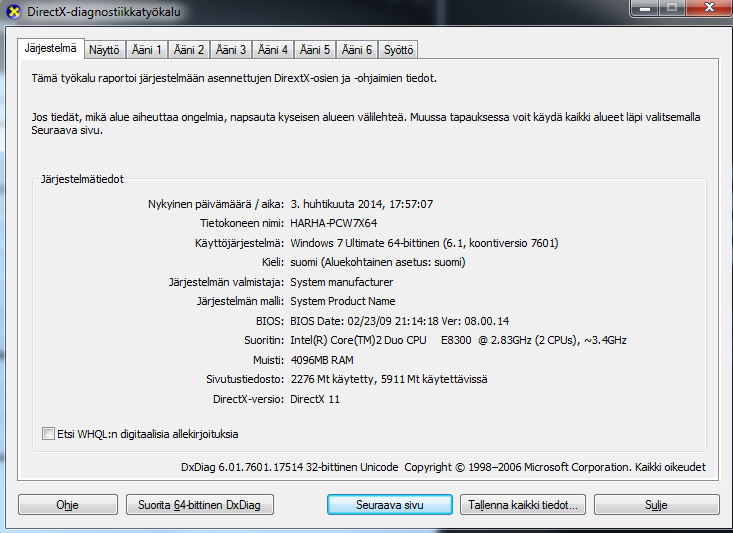
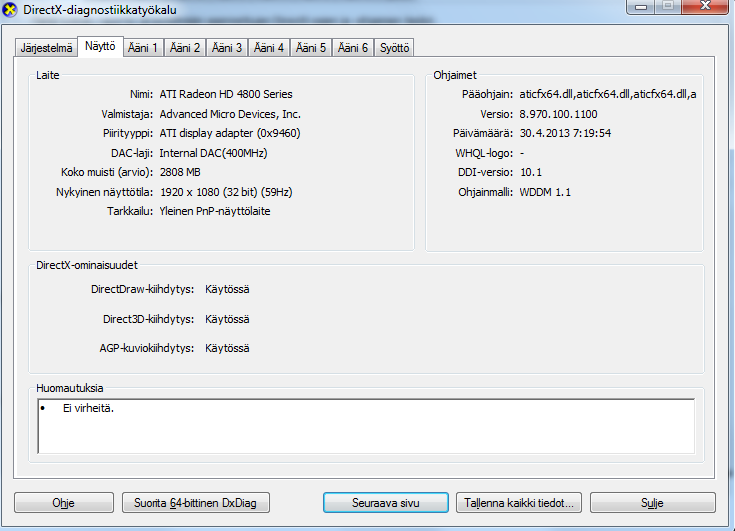
My DXDiag INFO:
Help appreciated... I'm losing my hope about this.
uninstalled my old Ati drivers and installed new HD4890 Win 7 x64 drivers from the amd site. I started the game and the outcome is still the same as you can see in the screenshot below. sad
Did you remember to delete the Spaceengine\cache folder after driver installation and before starting SE?
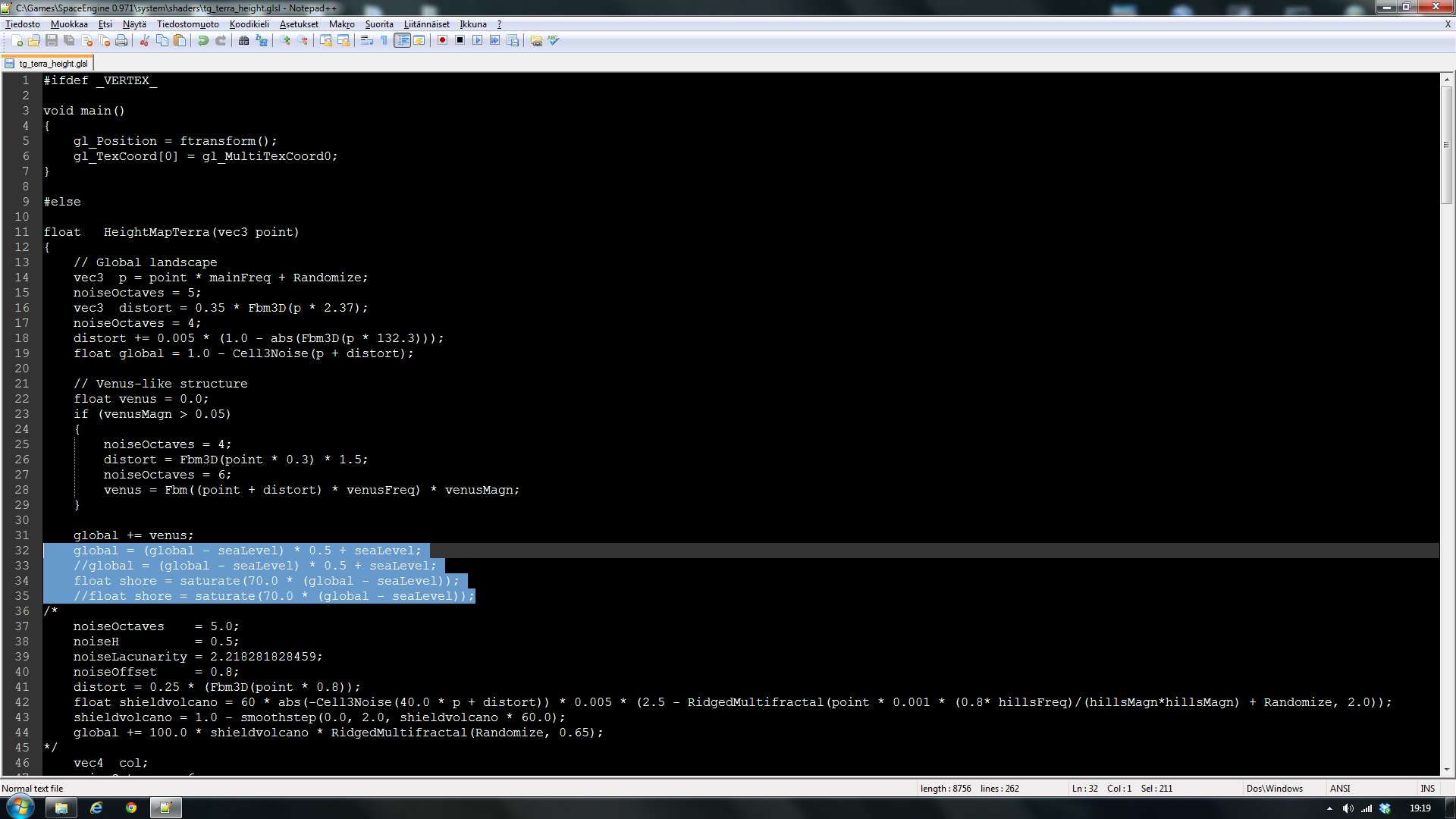
I'll... Try to fiddle around with the shaders and stuff, though I know nothing about them but oh well, you can always reinstall...
Edit: I played around with these float variables with no luck...
no,no,no, don't play with shaders. There is a setting in main.cfg that may help with your issue but I am not at home now and can't look into it. I have posted my main.cfg somewhere in the forum so if I find it I will tell you. In the meantime someone else with more knowldege will hopefully help you.
no,no,no, don't play with shaders. There is a setting in main.cfg that may help with your issue but I am not at home now and can't look into it. I have posted my main.cfg somewhere in the forum so if I find it I will tell you. In the meantime someone else with more knowldege will hopefully help you.
Yeah I know... It makes no sense to change shader settings because someone who made them has already made sure that they are correct.
I increased my Video memory size to the value my GPU has plus I changed some other booleans and such to fit my likings in main.cfg and guess what, the problem is solved I think!
I went on a random planet and saw smooth as silk terrain transitions from land to liquid. Never seen that before...
I attached my main.cfg for anyone else who has the same problem. And oh right, thanks for the tip dude!
EDIT:
Oh no it still freaking happens... Especially on Titans. Please tell me now that this isn't normal...
// turn off problem functionality BugMipmaps true // mipmaps generation bug on Radeons (crash)
Also try disabling aero because it consumes a lot of vram and your GPU has 966mb which is OK but when combined with SE it may not be enough.
Also try playing with these parameters from main.cfg (always write down the original values before any changes):
Code
// planets settings PlanetMipMapping false // use mipmapping for landscape textures PlanetTextureRes 256 // texture resolution (use only power of 2!) PlanetTextureBorder 1 // texture border PlanetHeightmapFormat 13 // format of the heightmap textures PlanetSphereMeshLOD 5 // spherical mesh detail PlanetCubeMeshLOD 5 // landscape mesh detail PlanetRingsSubdiv 16 // planetary rings detail PlanetCloudsTerra 3 // max number of cloud layers for terrestrial planets PlanetCloudsGasGiant 7 // max number of cloud layers for gas giant planets PlanetDetailCraters 3.0 // approx. min radius of craters on terrestrial planets (kilometers) PlanetDetailTerra 0.01 // approx. per vertex detail on terrestrial planets (kilometers) PlanetDetailClouds 0.1 // approx. per vertex detail on clouds (kilometers) PlanetDetailGasGiant 1.0 // approx. per vertex detail on gas giant planets (kilometers) PlanetDetailSun 1.0 // approx. per vertex detail on stars surface (kilometers) PlanetDetailTexScale 32768 // scale of detail textures PlanetDetailTextures true // use detail noise textures (remove cache to apply changes)
Especially with -PlanetDetailTextures -PlanetMipMapping
Ошибка: Windows 7 64x все драйвера в актуальном состоянии и правильно установлены. Ошибка в настоящее время опубликован несколько раз в течение короткого времени, когда я искал в таблице планете. Моя система: i7 ноутбук Quade Основной 4-го поколения, NVidia двойного в режиме SLI с 4 Гб, 16 Гб оперативной памяти. Неисправность должна лежать в своей программе.
dampflok01, why are you posting in Russian? If you know Russian better than English, then post on the Russian forum, they also have a knowledgeable and helpful community.
All forum users, please read this! My SE mods and addons Phenom II X6 1090T 3.2 GHz, 16 GB DDR3 RAM, GTX 970 3584 MB VRAM
I was looking for the 4th moon with life of a random gas giant, but then i saw this:
If you check the system browser i am selecting that 50km diameter gas giant. I guess that its just a glitch easily fixed by closing and reopening SE, but i have a full star browser(10000 stars) i havent visited yet.
Added (15.04.2014, 02:50) --------------------------------------------- Now it doesnt show up on solar system broswer at all after closing and reopening..(the image)
Intel® Core™ i5-3210M CPU @ 2.50GHz 2.50 GHz 750 GB hard drive 4 GB RAM intel ®HD Graphics 4000 1GB video; oh and i use a lot of commas
djgspee, it's not a bug. The system generates when you click on it, which means it calculates the color and rendering properties in the same way that it would if you were in the system, rather than as it would for stars as points.
If you want to talk about bugs, do it here. There is little reason to make a new thread for something like this.
All forum users, please read this! My SE mods and addons Phenom II X6 1090T 3.2 GHz, 16 GB DDR3 RAM, GTX 970 3584 MB VRAM
Seem to be having a strange bug here. When the time is not paused (not x0) and I try build a spacecraft, SpaceEngine instantly crashes. I checked the se.log file and I really could not find any "ERROR".
This only happens in the Solar System, and not in any other (procedural) system. Does anyone have an explanation for this?
Added (23.04.2014, 22:33) --------------------------------------------- UPDATE: Another new thing is happening, when I teleport spacecraft into the solar system, they just sometimes teleport 12939327.717 Gpc away.
 ENG
ENG New site




 Russian Federation




 Finland




 Greece


 Germany
 United States
 Mexico

 Poland


 Belgium